

Labeling · 6 min read
Image annotation tools, box, polygon or mask is decided by the question
A cracked insulator, a corroded patch and a person in a restricted zone each force a different geometry. The wrong shape means relabeling everything.
Summary
This post takes three scenes, a cracked insulator on a distribution line, a corroded patch on a pipe, and a person inside a restricted zone, and shows how the question each one answers dictates whether the label is a box, a polygon or a mask. It argues that the geometry is a decision made before labeling starts, because changing it afterwards means drawing every label again. It is for anyone choosing an annotation type for a new project.
Rob Hickey · Chief AI Officer · Oct 2, 2026
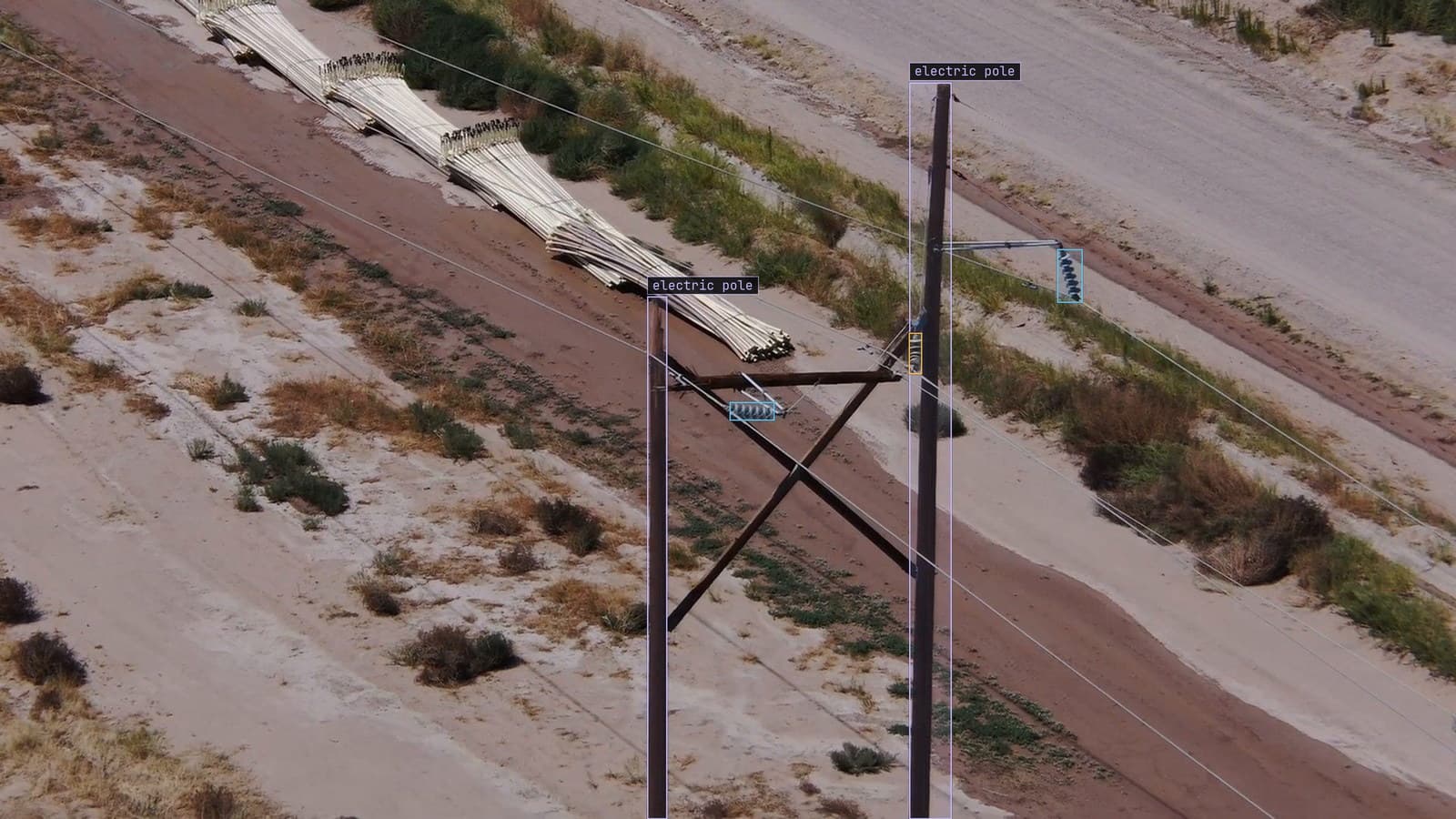
Distribution poles along a desert track, one insulator flagged as cracked, from a customer inspection run
Three frames sit in the same review queue on a Wednesday morning. The first is from a drone pass along a desert distribution line, and one insulator on a crossarm has a crack running through two sheds. The second is a pipe rack from a walkway, with a patch of rust across the third pipe. The third is a fixed camera on a substation fence, and there is a person standing inside the painted line that marks the switchgear zone.
Each of them will be labeled by a different tool, and the tool was chosen months ago, when somebody wrote down the question each camera was there to answer. The insulator got a polygon. The rust got a mask. The person got a box.
Nobody chose those geometries because one tool was better. They chose them because the answer each question needs is a different shape.
A bounding box answers where and how many
The substation question, for the camera on the north fence, is whether anyone is inside the zone, and if so where. A box around the person answers that. Its centre can be compared with the painted line the crew repainted in June, its presence can be counted, and it takes a labeler a few seconds. The person's exact outline adds nothing to the decision, because the rule fires on presence, and a box that is a little loose fires just the same.
Boxes are the default for a reason. They are the fastest to draw, the fastest to check, the cheapest to buy, and the label most questions turn out to need once the question is written down honestly. Where is it, how many are there, has it moved: box. The labeling guide says to start with boxes and upgrade the classes that prove they need more, and that ordering is the whole discipline.
The mistake runs the other way. A team labels every class with polygons because polygons feel more precise, spends four times the budget, and trains a detector that only ever uses the box the polygon fits inside.
A polygon answers how far the crack goes
The insulator question is different. The crew that dispatches trucks on Monday needs to know whether the crack is a hairline across one shed or a fracture across four, because those get different trucks on different weeks. A box around the insulator says an insulator is there, and a box around the crack says a crack is there. Neither says how far it runs.
The power line inspection page has it in one line: the dispatch decision needs the extent, and extent needs an outline. A polygon around the crack, vertex by vertex along its length, carries the length and the number of sheds it crosses. A crack is a thin, roughly linear thing with a clear edge against the ceramic, which is the shape a polygon draws well and a mask draws expensively.
The polygon is also what makes the label a measurement. Two inspectors can look at the same outline and agree on how many sheds it crosses. Two inspectors looking at a box agree that something is in it.
A mask answers how much area the rust covers
The rust on the third pipe of rack 2 has no edge to follow. It fades from deep orange through staining to paint that is nearly clean, and the report the inspection feeds needs the area of the patch, this quarter against last quarter. A polygon along that edge either has hundreds of vertices or it smooths the boundary, and the smoothing is where the area goes wrong. A mask, a value for every pixel, carries the ragged edge as it is.
The corrosion use case is where this lives: corrosion is graded on area and depth of coverage, which is what a mask encodes and a box discards. The label has to be the measurement. Masks are the most expensive label to draw and to check, and on a corrosion job they are the only one that produces the number the report is for.
Masks on a corrosion job today are mostly drawn by clicking a patch and correcting the proposal, which brings the cost down without changing what the label is. The person accepting the mask is still vouching for every pixel of the edge.
Choosing wrong means drawing every label again
My own view is that the geometry decision is the most expensive decision in a labeling project and the one made with the least thought. Change a class definition in March and you relabel the frames that class touches. Change from boxes to masks and you relabel everything, because there is no way to get a mask from a box. A polygon can be reduced to a box for free. A box cannot be grown into anything.
So the order of decisions is: write the question, derive the shape, then pick the tool that draws that shape well. On the desert line the question was "which towers need a crew this week", the shape was an outline, and the tool was a polygon tool with a magnifier. On the pipe rack the question was "how far has this spread", the shape was an area, and the tool was click and correct. On the substation fence the question was "is anyone in the zone", and a box tool with a zone overlay was the whole requirement.
One aside that is true across all three: the geometry a project starts with is almost never the geometry the second phase needs. The substation team, a year in, wanted to know whether the person in the zone was wearing the right gear, and that is a per-body question a box alone cannot answer. They added keypoints on the person. They did not have to redraw the boxes, because the question grew and the shape grew with it.
The model that trains on the label is the one that watches the feed
Whichever shape the question forced, the label goes through the same pass before it trains: Lexi proposes it on every frame, a person confirms, fixes or rejects it, and what trains is what the person accepted. The model then watches the drone footage, the walkway camera or the fence camera, in the cloud, on your servers, or on a runner beside the recorder. Frames it is unsure of come back to a person, the corrections retrain it, and the new version replaces the old one with no downtime.
The corrections come back in the shape the project chose. A doubted frame from the fence camera is fixed with a box in a few seconds and lands in the Slack channel as a resolved alert. A doubted frame from the pipe rack is fixed with a mask, and takes longer, and is worth it for exactly the reason the mask was chosen in the first place.
See it on your own footage.
Start with your footageMore in Labeling
Labeling · 7 min read
AI data labeling workflows, three ways to label footage and when each one pays
A pipeline right-of-way survey labeled three ways: every box by hand, Lexi proposing and a person checking, and synthetic frames for the leak nobody has filmed.
Rajiya Sultana · Oct 2, 2026
Labeling · 6 min read
Annotation analytics, the numbers a labeling queue produces besides labels
Three labelers on a month of warehouse footage produce boxes, and also a throughput, an acceptance rate and a map of where the rejections cluster.
Rajiya Sultana · Oct 2, 2026
Labeling · 7 min read
Annotation format conversion between COCO, YOLO and CVAT without losing a box
Three years of line inspection labels from two tools arrive in three formats. The boxes that shift are the ones nobody draws on a frame before training.
Esdras Ntuyenabo · Oct 2, 2026