

Computer vision · 7 min read
YOLO training best practices, what decides whether the model survives the factory floor
Frames from the floor itself, a labeling spec written before the first box, per-class recall over the average, and a loop that keeps running after go-live.
Summary
This post sets out what decides whether a YOLO model keeps working on a factory floor, from training on frames off that floor at the hours it runs to a labeling spec written first, conservative augmentation, per-class recall, a model size chosen for the runner, and the second cell treated as a new site. It argues that the version number is the least important line in the config and the loop after go-live is the most. It is for engineers training their first detector for a plant.
Stephen Biswas · Engineer · Oct 4, 2026
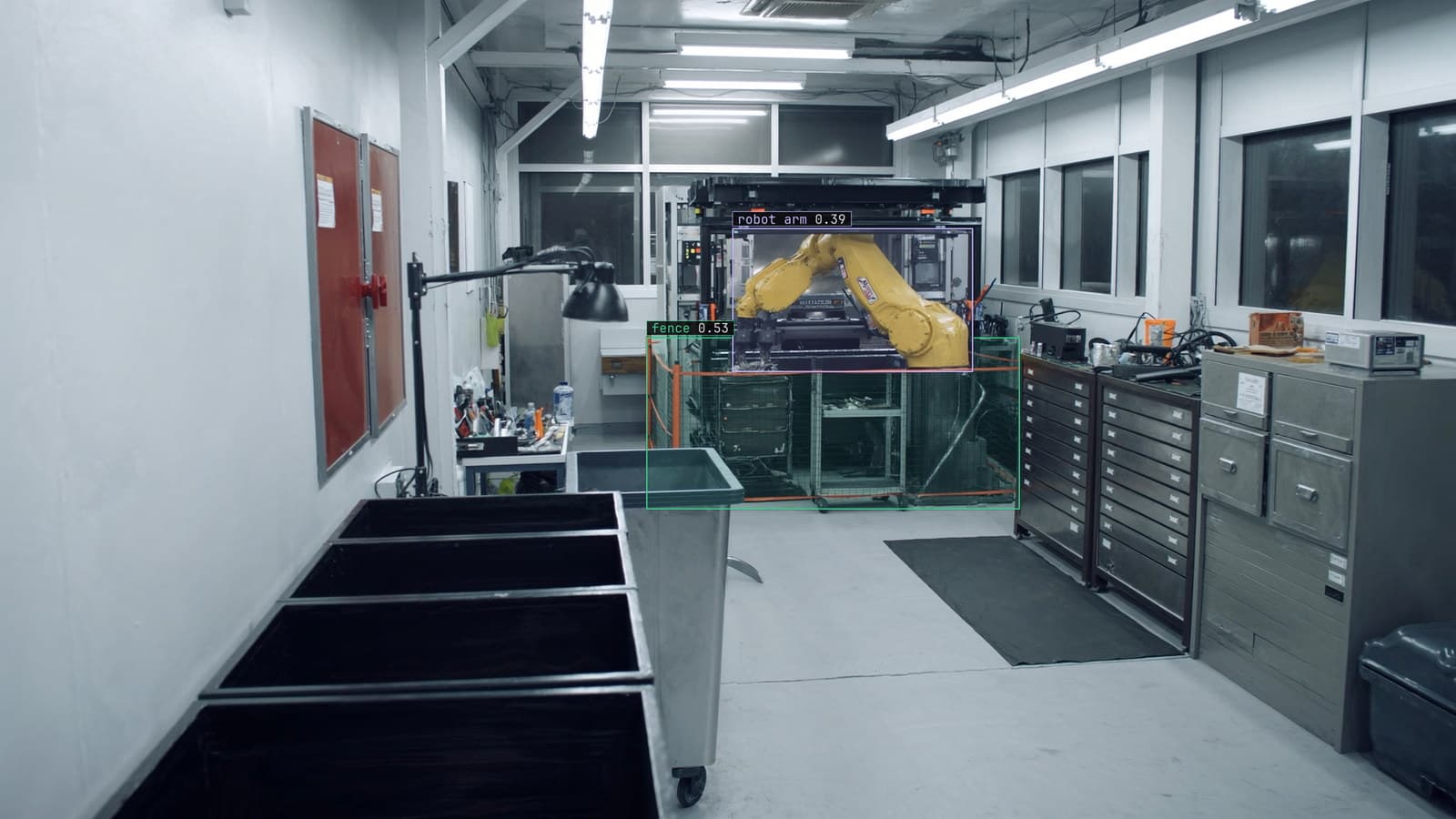
Factory floor, a robot arm loading parts into a CNC machine behind a safety fence, fence and robot arm boxed, generated scene with detections from our model
The camera over cell 3 watches a robot arm load parts into a CNC machine behind a safety fence, and the question the plant asks of it is whether a person is inside the fence while the arm is moving. A YOLO model is the natural choice for that camera: a single-pass detector that fits on the box in the cabinet and answers each frame before the next arrives. Whether it is still answering correctly a year later has almost nothing to do with the version number and almost everything to do with the six decisions below.
A YOLO model trained on bench frames meets the floor at 6 am
The training set has to look like the frames the model will meet, which means frames from the cell 3 camera itself, at the hours the cell runs. The floor at 6 am has half the lights up and a shift walking in. The floor at 2 pm has full lights and the overhead crane's shadow crossing the fence. The changeover at the end of the shift has a person inside the fence legitimately, with the arm locked out. A set collected on one clear afternoon has none of the frames that matter, and the model trained on it meets 6 am for the first time on its first morning live.
The lesson on how much footage you need puts the unit as distinct conditions, and on the floor they are the hours, the shifts, the changeover and the day the crane runs. Frames are sampled every few seconds rather than every frame, because adjacent frames are near duplicates and teach nothing new.
The labeling spec is written before the first box is drawn
The class list, the box rule and the occlusion rule for cell 3 are written down before anyone labels, and they are short. Person, arm, part. The box hugs the visible extent of the person and excludes the fence in front of them. A person half behind the machine is boxed on what is visible and never guessed. Inside the fence means the box's bottom edge is inside the fence line drawn on the frame.
Lexi proposes the boxes on every frame and a person checks each one against that spec before anything trains on it. Consistency is a training signal in its own right. Two labelers who disagree about whether the fence is inside the person's box teach the model that the edge of a person is somewhere in a band, and the model returns that band as loose boxes on the floor.
The operators call the fence "the cage", and the alert reads "person in the cage" because that is the sentence a supervisor understands at a glance.
Augmentation stays conservative and matches the floor
Augmentation makes copies of the training frames with changes applied, and on a fixed camera the changes should be ones the camera could actually produce. A brightness range that matches the floor between 6 am and full lights is useful. A horizontal flip is harmless on cell 3 because the cell is roughly symmetric. A vertical flip is not, because the camera will never see the floor upside down, and rotation is not either on a camera bolted to a beam. The mosaic augmentation that most training pipelines apply by default is fine for a general set and worth switching off on a fixed camera, where a frame stitched from four cells teaches spatial relationships the real camera never shows.
Per-class recall is the number to watch and the average hides it
A person inside the fence is rare. Most frames from cell 3 show the arm and the parts and no person at all. A model that finds every arm and every part and half the people has an excellent average and is failing at the one class the plant installed it for. Recall on the person class, on a held-out week the model never saw, is the number that matters, and the count of false alerts per shift is its partner, because a supervisor who gets ten false alerts a shift stops reading them.
Hold out the most recent week rather than a random slice. A random slice hides frames from every day in the training set, and the score flatters the model.
Model size is chosen for the runner in the cabinet
The YOLO family comes in sizes, and the size is chosen for the box beside the recorder rather than for the benchmark. A Jetson in the cell 3 cabinet takes a frame about every two seconds and has to return its boxes before the next one, and the small variant does that with room to spare; the large one does not. The model leaves the platform as PT, ONNX or TorchScript through a preset that names the device. The input resolution is fixed to what the runner will actually receive, because a score measured at full resolution on a server says nothing about the same model on the cabinet box.
The person class is large in the cell 3 frame, so the small variant loses little. A camera looking for a dropped fastener on the floor would set the floor differently.
The second cell is a new site and the model does not transfer
Cell 4 has the same machine, a different fence colour, a camera a metre higher and a window that throws afternoon light across the floor. The cell 3 model rolled out to cell 4 is visibly worse, and the drift catalog's note on a new site coming online is the honest explanation: it is doing exactly what a model trained on one site does. A few hundred checked frames from cell 4, folded into the set before cell 4 goes live, is the whole of the fix, and it is cheaper than the week spent wondering whether the model is bad.
The loop is what keeps the model on the floor
LexData takes the cell 3 model through its whole life. You type what to look for, Lexi puts a box on every frame, and a person checks each label before anything trains on it. The model then watches the cameras the plant already has, in the cloud, on your servers, or on a runner beside the recorder. Frames it is unsure of come back to a person, the corrections retrain it, and the new version replaces the old one with no downtime.
After go-live the doubted frames are the training set's supply line. The person half behind the machine, the 6 am frame with the lights half up, the contractor in a colour of hi-vis the model has never seen: each comes back, is corrected, and is in the set the next version trains on. When the supervisor's overrides cross the project's threshold a new version is trained, sized for the same Jetson, and rolled out while the old one keeps watching. The 99%+ accuracy maintained in production in our manufacturing cases is the result of that loop running rather than of the first training run.
My own view is that the version number of the YOLO model is the least important line in the training config, and the one that gets discussed most. Any recent version exports to the cabinet box and trains on the floor's frames. The six decisions above are where a year of accuracy is won or lost, and none of them is on a model card.
See it on your own footage.
Start with your footageMore in Computer vision
Computer vision · 7 min read
Five computer vision applications in production, on the cameras a site already owns
Detect, count, inspect, track and read are the five jobs a fixed camera can be given, and each is a different question with a different label behind it.
Ayman Quadir · Oct 4, 2026
Computer vision · 6 min read
Computer vision projects worth building on the cameras you already have
A plant, a utility, a grower, a store and a warehouse each have a project that starts on an existing camera, produces a decision, and has someone to act on it.
Ayman Quadir · Oct 4, 2026
Computer vision · 6 min read
How to choose an object detection model architecture for a camera on your own site
Start from the decision the plant has to make, then the box beside the recorder the model has to fit, and only then the family. The benchmark comes last.
Andreas Ohrvall · Oct 4, 2026