

Operations · 6 min read
Danger zone monitoring with object detection on a site camera
A polygon over the crane swing radius on a site camera. People and vehicles as classes, the bottom of the box as the test, the alert with the frame attached.
Summary
This post builds a danger zone monitor for a crane lift on a well pad, with a polygon drawn on the frame, people and vehicles as classes, the bottom of the box as the inside test, and tracking so the alert fires once per entry. It concludes that the zone definition is most of the work and that a nudged camera is what breaks it. It is for site safety and operations teams with a mast camera over a lift area.
Esdras Ntuyenabo · Engineer · Sep 27, 2026
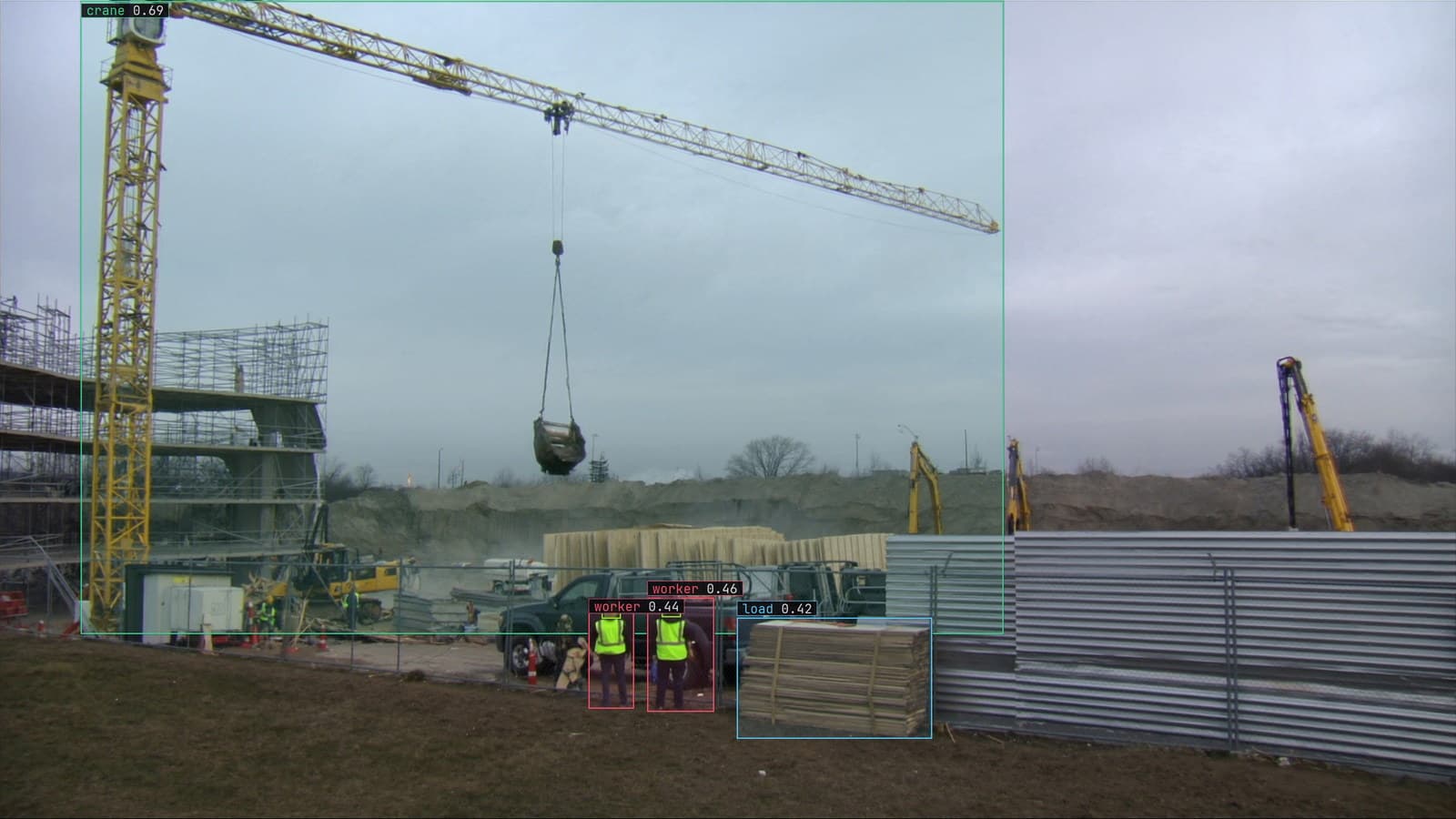
Crane lift from a pole camera, generated scene with detections from our model
The lift starts at 6 am. A crane on the pad is picking a vessel section off a flatbed, and the swing radius is marked on the ground with tape and cones that will be walked over by nine. The camera on the mast sees the whole pad. What it should be watching is one shape: the area under the boom, and whether anyone is standing in it while the load is up.
Drawing that shape on the frame, and deciding what counts as inside it, is most of the work. The rest is a model that finds people and vehicles, which is the cheap part.
The zone is a polygon drawn in the camera's own coordinates
The exclusion zone is an ordered list of corners that traces the swing radius as the mast camera sees it, foreshortened and off-centre. A circle on the site plan does not survive the trip into the frame. The polygon means something only for as long as the picture is the one it was drawn on.
Draw it on a frame from the live camera before the 6 am lift, walk the tape line with someone in a vest, and check that the person's feet sit inside the shape where they should and outside where they should not. A polygon whose edges cross or whose corners were entered in the wrong order gives unpredictable answers, and the check with a person in the frame catches that before the lift does. My own view is that the walk is worth doing before every lift, and that is more than most sites will manage.
The cones, by the way, were back in the store by nine because the forklift driver needed the lane.
Object detection with two classes is the cheap part
The model needs two classes: person and vehicle. That is a modest object detection task on site footage, and starting from weights trained on general footage, a small set of frames from the mast camera under morning and afternoon light produces a working first version. The labeling is boxes. You type the two classes, Lexi proposes a box around every person and vehicle on every frame, and a person checks each one, including the ones half behind the flatbed.
The class matters because the rule differs by class. A vehicle inside the zone during a lift is one severity; a person is another. Drawing them in different colours on the frame is what lets the banksman read the situation in a glance, red for a person under the load, amber for a vehicle, white for everything outside.
The bottom of the box is the point tested against the zone
Inside the zone is a point test, and the choice of point matters. The centre of a box around a standing person sits at their waist, which can be outside the polygon while their feet are inside it, especially on a camera looking down from a mast. The bottom-centre of the box is where the person touches the ground, and the ground is where the tape line is. So the bottom-centre is what gets tested against the polygon, for people and for vehicles.
A person leaning over the tape with their feet outside is outside. A person stepping over it at 6:40 is inside on the frame their foot lands. That is the behaviour a banksman would want.
Tracking stops the box flickering at the edge of the zone
Detect every frame on its own and a person standing still at the edge of the zone flickers in and out as the box moves a few pixels each sample. The colour flips, the alert fires and clears, and by 7 am nobody is looking at it. Tracking gives each person a stable identity across frames, so the question becomes "has this person entered the zone" rather than "is there a box inside the polygon right now".
Tracks get lost when two people cross or a vehicle passes between them and the camera, and the tracker will sometimes give the same person a new identity. That is tolerable if the alert is designed for it.
The alert fires once per entry with the frame attached
The alert is a rule written as a sentence, with a severity and a cooldown, approved before it goes live. A person inside the crane zone on the pad camera is critical, a vehicle is a warning, and both go to the lift supervisor in Slack with the frame attached. One alert per entry with a cooldown, rather than one per frame, means a brief identity switch does not page the supervisor twice. The frame carries the polygon and the coloured box, so the supervisor sees who and where without opening anything, and on the sites we run with a runner beside the recorder the alert fires on site first and the footage never leaves.
That is the hazard zone intrusion use case in its own words: a person box plus a zone drawn once, the decision being whether a point crosses a line, and the effort belonging in the zone definition rather than the model. The oil and gas work behind our numbers, 12k+ precision image annotations delivered, started with exactly these classes on rig footage, machinery and people, boxed and checked by hand.
A nudged camera moves the zone onto the walkway
This is what breaks it, and it breaks quietly. A wash-down, a gust, a bracket re-tightened, and the mast camera now points four degrees to the left. Detection is unchanged; people are still found. The polygon is where it was on the frame while the ground under it has shifted, and the zone now covers a strip of walkway beside the pad. Every alert is wrong, and no model metric will show it, because the model is doing its job on a picture that no longer means what it did.
The drift catalog calls this a camera moved, and it is the condition that ruins this use case fastest. The signal is the supervisor dismissing alerts for people who are plainly on the walkway, in the same direction, on the same camera, from one day. The fix is a check of the frame against the tape line on a schedule, and again after any maintenance ticket on the mast.
LexData takes the zone model through its whole life. You type what to look for, Lexi puts a box on every frame, and a person checks each label before anything trains on it. The model then watches the pad camera, on a runner beside the recorder or on your servers. Frames it is unsure of come back to a person, the corrections retrain it, and the new version replaces the old one with no downtime. The zone is the part a person has to keep honest, and the override rate is how it says so.
See it on your own footage.
Start with your footageMore in Operations
Operations · 7 min read
Active learning for computer vision on a line camera that never stops
The weld camera runs three shifts. The model returns the frames it doubts, the inspector corrects them, and past the threshold a new version trains and ships.
Rob Hickey · Sep 27, 2026

Operations · 7 min read
Camera focus measurement for a fixed camera that slowly goes soft
A lens loosened by vibration fails over weeks, and the model suffers before anyone sees blur. A sharpness score against the camera's own history catches it.
Rajiya Sultana · Sep 27, 2026
Operations · 8 min read
Collecting image training data from a production line without keeping every frame
A carton line's model starts missing a new print. Sample the frames it doubts, drop near-duplicates, review them, and let corrections train the next version.
Sheikh Srijon · Sep 27, 2026