

Edge · 7 min read
CPU vs GPU for computer vision inference, and when a CPU is enough
A cap station checked every couple of seconds and a shelf camera sampled every few minutes both run on a CPU. The GPU earns its keep when the load piles up.
Summary
This post puts two cameras on the same question, an inspection station that checks a bottle cap every couple of seconds and a shelf camera sampled every few minutes, and shows why both are CPU work until the number of cameras or the kind of task changes. It concludes that the GPU is bought for a measured load on the site's own frames, and that the choice of where the model runs is made per site. It is for engineers sizing inference hardware without a vendor's benchmark.
Andreas Ohrvall · CTO · Oct 1, 2026
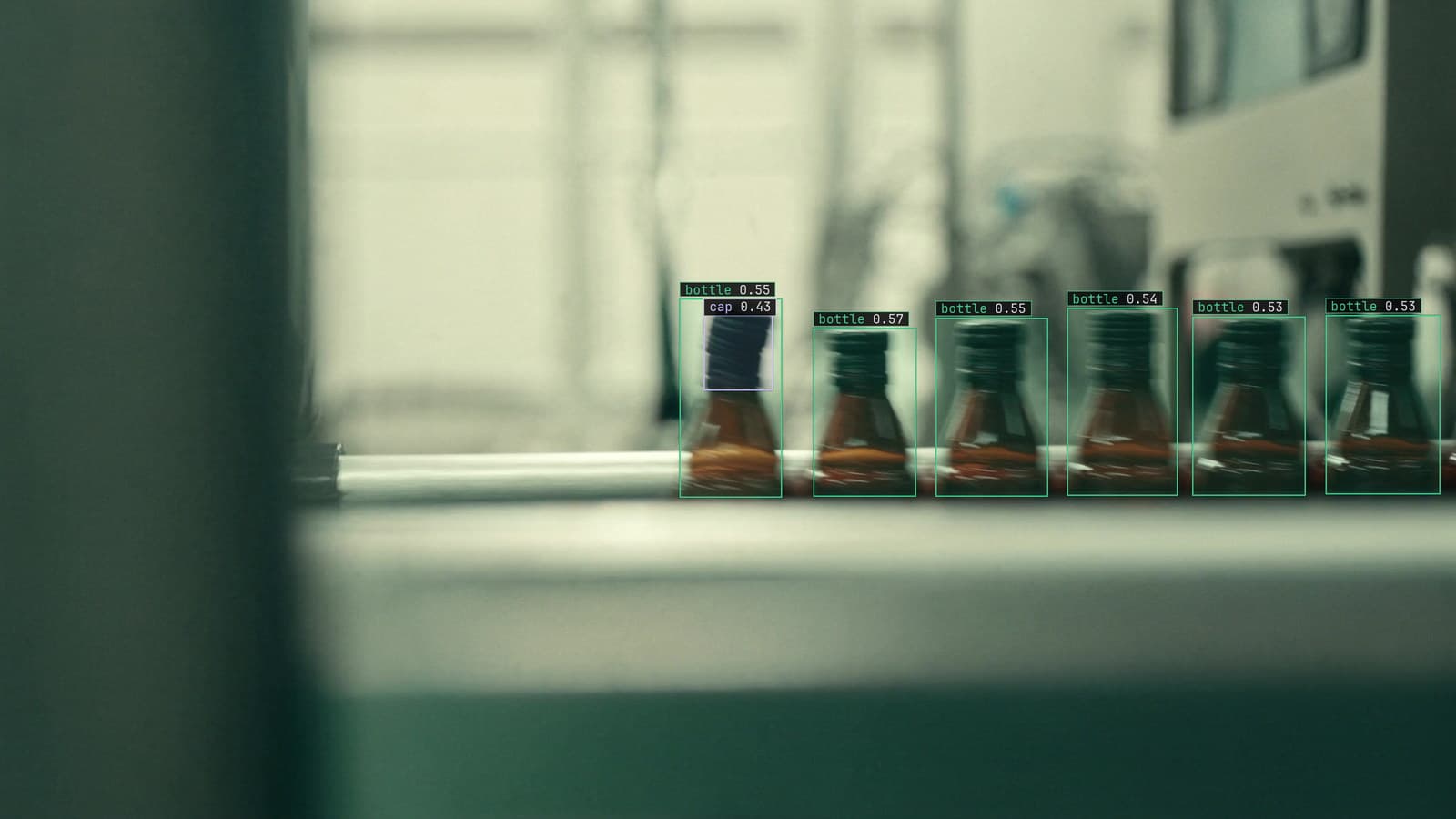
Bottling line with bottles and caps boxed under the inspection camera, generated scene with detections from our model
The inspection station at the end of the bottling line looks at a cap every couple of seconds and decides whether it is on straight. Across town, a camera over the cereal aisle at the Leeds store is sampled every few minutes to see whether a facing has emptied. Both teams have been told they need a GPU. Neither does, yet, and the reason is the same for both: the work is one frame at a time, and one frame at a time is what a CPU has always been good at.
The GPU question is really two questions. How many frames per second does the site actually need the model to look at, and how heavy is each frame's work. Most sites answer the first with a much smaller number than they expected.
One camera sampled every two seconds is CPU work
The cap station's camera runs at whatever rate it runs at, and the model samples a frame from it about every two seconds, which is one frame per bottle at the line's pace. A detector that puts a box on the cap and a box on the bottle neck, on one frame, on a modern CPU, finishes with time to spare before the next bottle. The verdict lands while the bottle is still under the camera, which is all the line asks.
That margin is what to measure. If the model finishes each frame well inside the two seconds, the CPU is enough, and the spare time is headroom for the day the line speeds up. If it finishes just inside, the site is one line speed change away from a queue, and there are cheap fixes, resolution, sampling and change gating, to try before the hardware one.
The station's runner is a small industrial PC in the cabinet under the conveyor, with no graphics card and a fan that runs more in July.
A shelf camera sampled every few minutes barely wakes the CPU
The cereal aisle is the other end of the scale. A facing empties over minutes, and a sample every few minutes catches it in time for the 7 am restock list. The model runs a few times an hour per camera, and a store with a few dozen aisle cameras is asking a CPU for a few frames a minute in total. The box in the store's back office that runs the recorder can run the model as well and not notice.
That store's question is never the GPU. It is whether the runner can reach every camera on the store's network, and whether the sampled frames leave the building. The deployment guide covers the runner beside the recorder and what stays on site.
Object detection per frame is the cost, and the sample rate multiplies it
The work a CPU does is object detection on one frame, and the cost of that is set by the model's size and the frame's resolution. The load on the box is that cost multiplied by the frames per second across every camera it serves. The cap station on line 1 is one camera at one frame every two seconds. The store is a few dozen cameras at one frame every few minutes each, which adds up to less than the cap station.
Two things push the multiplication past what a CPU carries. The first is cameras: the same model on twenty streams, each sampled every two seconds, is ten frames a second in aggregate, and a CPU that handled one comfortably handles ten with a queue. The second is the task: keypoints on every person, or an outline of every defect, cost several times a box per frame, and a station that was comfortable with boxes is not with keypoints.
Resolution sits under both. A model fed the camera's full frame does the resize on the CPU before it does anything else, and matching the capture resolution to the training resolution is the first thing to check on a CPU that seems slow.
A GPU earns its cost when the cameras or the task pile up
There is a point where the multiplication crosses the CPU's line, and it is worth knowing where before it happens. A distribution building with twenty cameras on one runner, all watched for people in forklift lanes, is past it. A plant that wants posture checks on its packing stations, keypoints on every person on every sampled frame, is past it on far fewer cameras. A station that needs a verdict between bottles with no margin, on a line that runs fast, may be past it on one camera.
At that point the GPU is not a luxury. It is the only way to keep the queue flat, and its cost per camera hour, spread over that many frames, is lower than the CPU's would be. The pricing page describes the plan bands, and where a site's cameras and tasks land is what our team sizes with them.
My own view is that the GPU decision should be made on the queue's age rather than on a benchmark. A runner whose oldest waiting frame is seconds old is fine. One whose oldest waiting frame is a minute old and climbing needs a GPU, or fewer cameras, and the age tells you which week.
The answer changes with where the model runs
The model can run in three places: in the cloud, on a server the customer owns, or on a runner beside the recorder. The cap station's model lives on the runner because the verdict cannot wait for a round trip, and the runner is a CPU box because one camera at one frame every two seconds is what it needs. The store's model lives on the recorder's box for the same reason and the same size. A GPU for either would sit idle.
The place a GPU makes sense is where the frames from many cameras arrive at one box. That is a plant's server room with all the line cameras on it, or the cloud, where a site with many cameras and no wish to buy hardware sends its sampled frames to be looked at together. That is the case where the aggregate frame rate is high enough to fill the card, and where the card's cost is spread across enough cameras to be worth it.
LexData takes the cap model through its whole life. You type what to look for, Lexi puts a box on every cap in every frame, and a person checks each label before anything trains on it. The model then watches the line camera the plant already has, in the cloud, on your servers, or on a runner beside the recorder. Frames it is unsure of come back to a person, the corrections retrain it, and the new version replaces the old one with no downtime. The retraining is the same wherever the model runs, so the hardware under the model can change without the model's life changing.
Measure on the site's own frames before buying anything
A benchmark from a vendor is a number for their frames at their resolution with their model, and none of those is the site's. The measurement that matters is the one taken on the cap station's frames, at the cap station's resolution, with the cap station's model, on the box that is already in the cabinet. That measurement takes an afternoon and produces the only number the purchase should be based on: how long each frame takes, and how many frames a second the site needs.
The bottling line's engineer ran that test on the cabinet PC on a Thursday, found the model finished each frame in a fraction of the gap between bottles, and cancelled the graphics card order the same day.
See it on your own footage.
Start with your footageMore in Edge
Edge · 6 min read
Computer vision on multiple video streams from one runner
Twenty cameras, one box beside the recorder. Fair sampling, a slow camera that drops its own frames, an unplugged one that stalls nobody, one heartbeat each.
Andreas Ohrvall · Oct 1, 2026
Edge · 6 min read
Deploying computer vision models to edge devices beside the camera
A robot cell that cannot wait for a round trip and an orchard with no uplink. Export by device, run beside the recorder, and get the next version out there.
Andreas Ohrvall · Oct 1, 2026
Edge · 6 min read
Edge computer vision for industrial automation, where the camera is the heaviest sensor on the plant network
A plant network built for PLC tags was never built for video. The runner beside the recorder turns frames into events, and only events cross the network.
Andreas Ohrvall · Oct 1, 2026