

Labeling · 6 min read
EXIF orientation, the photo that is sideways only to the model
A phone photo looks upright on every screen and arrives rotated in training, because the pixels never turned. The check to run at import, before the first box.
Summary
This post explains the EXIF orientation flag, why a phone photo that looks upright everywhere can reach a model on its side, and how boxes drawn in one tool land on the wrong pixels in another. It concludes that the rotation should be applied once at import and the flag stripped, with a check that compares a sample of frames against what the annotator saw. It is for teams mixing phone photos and fixed-camera frames in one dataset.
Stephen Biswas · Engineer · Sep 29, 2026
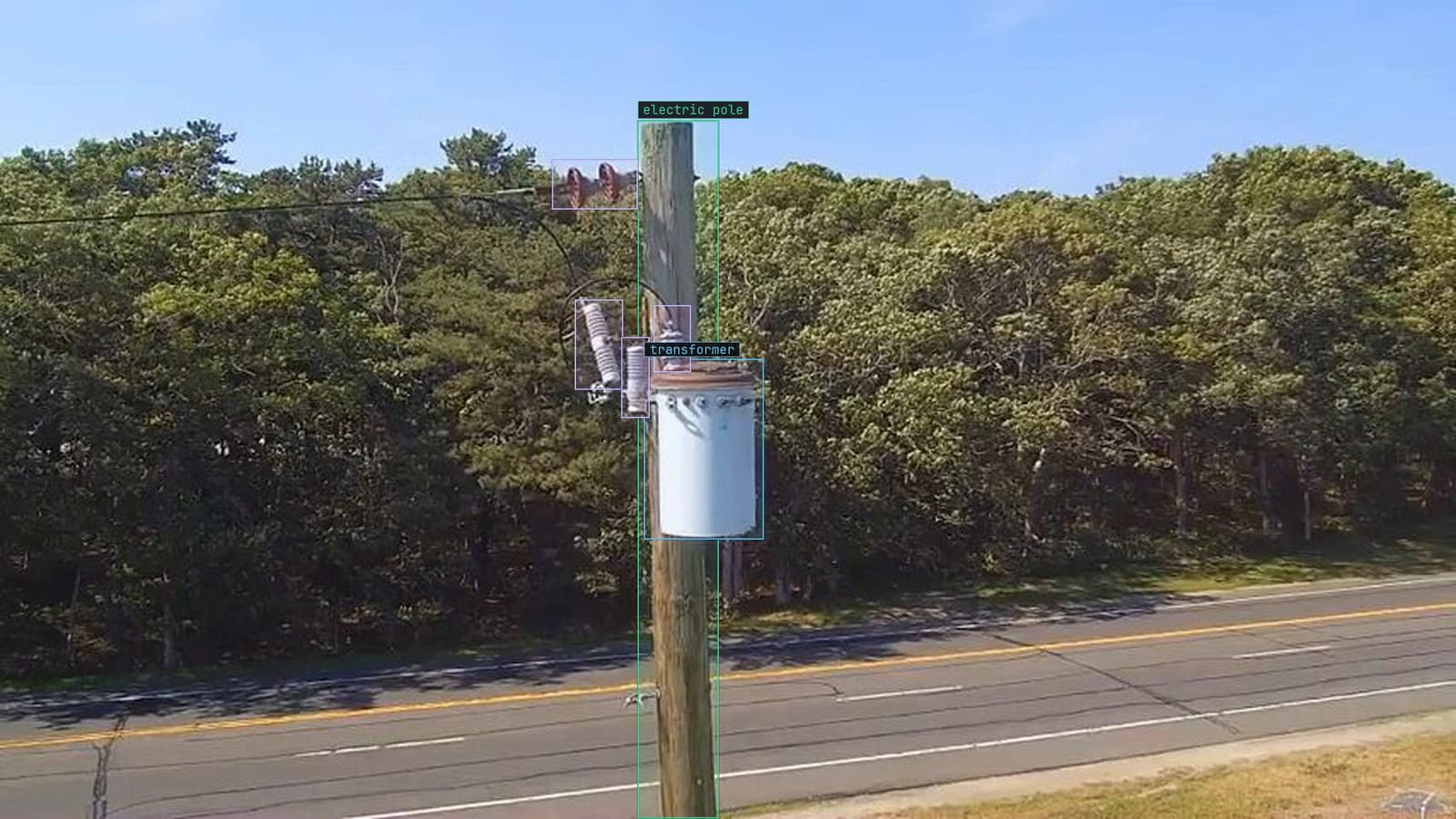
Pole transformer photographed from the ground, transformer and insulators boxed, from a customer inspection run
The dataset for the substation model comes from two places. A fixed camera on the fence post, which produces the same framing every two seconds, and the technicians' phones, which produce whatever angle a person standing under a transformer at 7 am found easiest. The phone photos look fine on the phone. They look fine in the gallery on the laptop. They look fine in the annotation tool the team used in March.
In the training pipeline in April, a quarter of them are on their side, and the boxes the team drew on them are on the wrong part of the picture.
The orientation flag is a note, and the pixels never turned
A phone held sideways does not rotate the picture it takes. The sensor records the pixels in the sensor's own orientation, and the phone writes a small note into the file's EXIF header saying which way was up when the shutter fired. Every viewer that reads the note turns the picture before showing it. The pixels in the file stay where the sensor put them.
So a photo of a pole transformer, taken with the phone held in landscape, is stored as a landscape image of a transformer lying on its side, with a flag whose meaning is rotate before display. The technician never sees the sideways version, because the technician's phone reads the flag.
The fixed camera on the fence post writes no flag at all. It has no accelerometer, no idea which way is up, and its frames are stored exactly as they will be shown. Which is the aside worth keeping: the camera nobody worried about is the only source in the dataset that cannot be sideways.
Some tools honour the flag and others read the pixels raw
Here the two halves of the pipeline disagree. The annotation tool the team labeled in reads the flag, shows the transformer upright, and records a box around it in the upright coordinates. The training loader reads the file with a library that ignores the flag, gets the raw sensor pixels, and applies the box. The box is now around a patch of sky beside a transformer lying on its side.
Nothing errors. The loader is doing what it was told, the tool did what it was told, and the label file is internally consistent with one of them. The model trains on a fraction of frames where the box is wrong, and the first sign is a version that is oddly weak on exactly the photos the technicians took.
It gets worse when the dataset is exported and reimported. A COCO file carries box coordinates and an image reference, and says nothing about which orientation those coordinates were drawn in. Two tools that disagree about the flag will disagree about every box in the file, and neither will say so.
Boxes drawn upright land on rotated pixels in training
The failure has a shape that helps find it. On a portrait photo shown upright, a box in the top left of the transformer sits, in the raw pixels, in a corner that depends on the flag's value. For the common case of a phone turned one way, the box lands in the top right of the raw frame, mirrored across the diagonal. For the other way, the bottom left. A model sees these as boxes on nothing in particular.
The technician who took the photo on Tuesday cannot help, because they saw it upright. The annotator cannot help, because they saw it upright too. The only place the rotation is visible is inside the loader, which nobody looks at, which is why this survives into training.
The check to run at import, before the first label
The check is not clever and it is worth running on every batch that includes a phone. Read a sample of files twice, once honouring the flag and once ignoring it, and compare the dimensions. A file whose width and height swap between the two reads has a rotation flag doing work. Count them, and open a few beside the boxes.
The three lines that matter, in Python with the imaging library most loaders use:
from PIL import Image, ImageOps
raw = Image.open(path)
fixed = ImageOps.exif_transpose(raw)
If raw.size and fixed.size differ, the flag was live. Everything downstream should see fixed.
The quickstart has a step on uploading original files rather than compressed exports, and this is the companion rule: upload originals, and settle the orientation at the door.
Bake the rotation in once and strip the flag
There are two ways to make the pipeline consistent. One is to teach every loader to honour the flag, which works until somebody adds a loader that does not. The other is to apply the rotation to the pixels once at import, save the upright pixels, and remove the flag, so there is nothing left for a downstream tool to interpret differently.
My own view is that the second is the only defensible choice for a dataset that will outlive the team that built it. A flag is a promise that every future reader will behave, and the promise is broken by the first script somebody writes at 11 pm to get a training run started.
The one case for leaving the raw orientation alone is a model that will run on the same phones, in the same raw orientation, with no viewer in between.
That is rare for inspection work, where the frames are seen by a person at labeling time and by a model afterwards, and both should see the same picture.
An annotation tool has to show the frame the model sees
The labeling step is where orientation should be settled, because it is the last point where a person is looking at every frame. When a technician's photos come in beside the fence-post frames, the labeling pass should show each frame exactly as the training loader will read it, so that a box drawn on the transformer is a box on the transformer's pixels.
On the substation project, that means the import step turns every phone photo upright and strips the flag before Lexi proposes a box on it, and the person checking the box sees the same pixels the model will train on. An annotation tool that quietly applies the flag for display and stores boxes in display coordinates is showing the annotator a different picture from the one the model gets, and the difference does not surface until the model is weak on the photos that mattered.
The fence-post camera keeps producing its two-second frames, flagless and upright. The phones keep producing whatever angle the technician found easiest at 7 am. With the rotation applied at import, the two sources become one dataset, and the box the technician's colleague checked is the box the model learns.
See it on your own footage.
Start with your footageMore in Labeling
Labeling · 6 min read
COCO as a format you will use and a benchmark you should not trust
COCO JSON is the file a bottling line's labels travel in. The COCO benchmark is a score on somebody else's eighty classes, and none of them is a missing cap.
Sheikh Srijon · Sep 29, 2026
Labeling · 6 min read
What a model trained on ten frames is good for
Ten labeled frames from a new site camera give a first pass by the end of the afternoon. Trust it for the obvious, and let its doubts grow the set.
Sheikh Srijon · Sep 29, 2026
Labeling · 7 min read
Choosing an annotation tool for a month of inspection footage
The demo set labels itself in an afternoon. A month of drone footage is where the tool has to propose boxes, take corrections and review every label.
Sheikh Srijon · Sep 29, 2026