

Labeling · 7 min read
Choosing an annotation tool for a month of inspection footage
The demo set labels itself in an afternoon. A month of drone footage is where the tool has to propose boxes, take corrections and review every label.
Summary
This post lists what an annotation tool has to do once a team moves from a demo set to a month of its own inspection footage, from task coverage and model-proposed boxes to a review stage on every label and a clean COCO or YOLO export. It concludes that the cost that matters is a person's minutes per frame in the second month, once the corrections have started to compound. It is written for inspection and operations teams about to label their first real batch.
Sheikh Srijon · GTM Lead · Sep 29, 2026
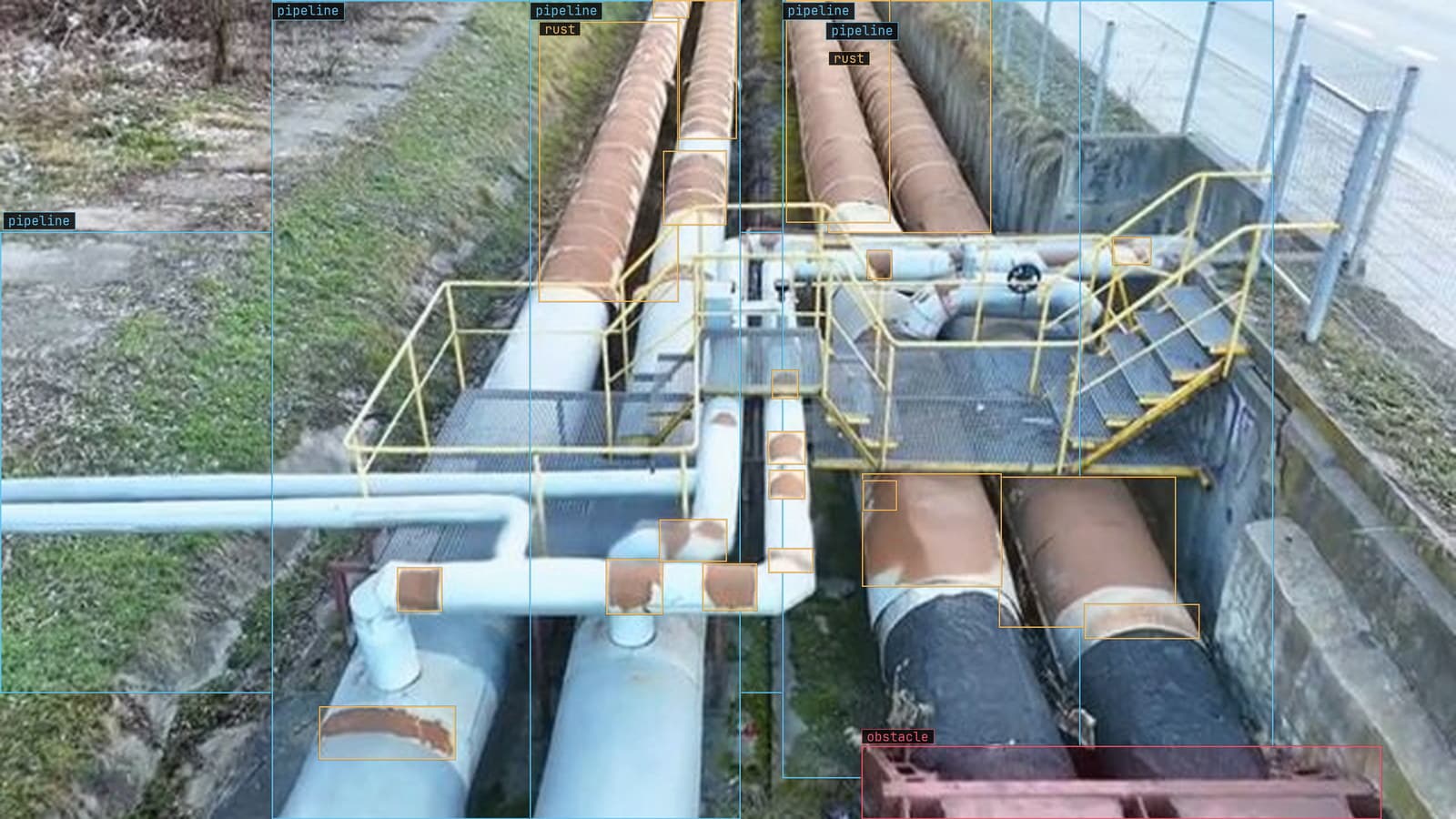
Pipe rack with rust and a dent boxed, from a customer inspection run
The utility's drone team comes back on a Tuesday from a month on the distribution line with a drive full of footage: poles, crossarms, insulators, the odd rusted pin, and a great deal of sky. The plan is a model that flags the damaged hardware so the crew stops scrolling. Before that model exists, somebody has to put a box on every insulator in every frame, and the tool that felt fine on the twenty-image demo set is about to be asked to do it a few thousand times.
That is the moment the choice gets made, whether or not anyone makes it on purpose.
The task list picks the annotation tool before price does
Start with what the frames need. An insulator is a box. A cracked shed on that insulator, where the crew wants to know how far the crack runs, is a polygon. A conductor is a line, and a pole is a box the model will find easily and a person will still have to check at the edge of the frame. A month of footage from one line already needs three annotation types, and a tool that handles one of them well and the other two through a plugin will show it by the second week.
Tracking matters more than it looks on the demo. A drone pass sees the same insulator on forty consecutive frames, and a tool that treats each frame as a fresh image is asking a person to draw the same box forty times.
Instance tracking across frames turns that into one box and thirty-nine confirmations.
The class list is the other early decision. The words the crew uses on the Monday radio call, "rust on the pin", "cracked shed", "broken tie", are the classes, and the tool should take them as written. The labeling guide covers why the class names should be settled before the first box and written down when an edge case forces a ruling.
The model proposes the box and a person makes it true
On the demo set a person draws every box by hand, which is fine for twenty images and a career for four thousand. The annotation tool that survives the month is the one where a model, Lexi in our case, puts a first box on every frame and the person's job becomes checking rather than drawing.
That changes what a person is doing all day. Instead of tracing an insulator, they are looking at a proposed box and asking whether it is right, close, or wrong. Right gets a confirmation. Close gets nudged. Wrong gets deleted and redrawn. The proposed box is a draft, and the person's verdict is the label.
There is a trap in that, and it is worth naming. A plausible wrong box gets accepted more often than an empty frame gets a missed box drawn in, because the draft anchors the eye. Two habits break it: a small random sample re-checked from scratch each session, and a deliberate second pass looking only for what the model missed rather than what it drew. A tool that makes both easy is doing a job the licence page never mentions.
Every label passes a review before anything trains on it
The first version of the model is only as good as the labels it trained on, and a label nobody checked is a guess with a box round it. A review stage on every label is the part of the tool the demo never exercised, because on twenty images the person who labeled them also reviewed them and called it done.
On a month of line footage the review is a workflow. A frame the annotator was unsure of goes to a queue with a reason attached. Somebody who knows what a cracked shed looks like from thirty metres opens the queue and rules on it. The ruling becomes a note in the class definitions, and the next frame with the same question already has an answer.
We check every label this way before it trains, and it is how labels come back at up to 99.9% accuracy across the millions of annotations we have checked by hand.
The number is less interesting than the habit: the review is not a final pass at the end of the month, it is the step between a draft and a label, every time.
The export has to be the dataset, with nothing re-encoded
The month ends and the dataset leaves the tool, either into the team's own training pipeline or into the platform's. Two things have to be true at that point. The export has to be a format the pipeline reads without a conversion script, which in practice means COCO JSON or YOLO TXT, and the frames inside it have to be the frames that went in.
The second half is the one that gets skipped.
A tool that re-encodes footage on import has quietly changed every pixel the model will learn from, and the drone's original frame and the frame the model trained on no longer match. The check is simple: export a frame and compare it with the original. If the footage came in from S3 or a drive and left as COCO with the original frames referenced, the tool did its job.
An aside from the line crews: the drone pilot's flight log is often the best index to the footage anyone has. A tool that lets a person attach a tag per frame with the pole number from that log saves the crew a search later.
The second month is where the corrections have to compound
The month of footage gets labeled and the model ships. The line does not stop being flown. New footage arrives, the model proposes boxes on it, and a person checks those. The corrections from that session should make the next session's drafts cleaner, and a tool where they do not is a tool where every month costs what the first one did.
LexData takes the model through its whole life on that basis. You type what to look for, Lexi puts a box on every frame, and a person checks each label before anything trains on it. The model then watches the footage the crew already flies, in the cloud, on your servers, or on a runner beside the recorder. Frames it is unsure of come back to a person, the corrections retrain it, and the new version replaces the old one with no downtime. The platform page walks through that loop in the product's own words.
My own view is that the second month is the only honest test of an annotation tool. Any tool looks good on the first batch, because the first batch is where everyone is paying attention. The second batch arrives when the team has moved on, and the tool either carries what it learned or it asks the same questions again.
Cost is a person's minutes per frame, once the drafts are good
Licence prices are the easy number to compare and the least useful one. The cost of labeling a month of footage is the minutes a person spends per frame, multiplied by the frames, plus the frames that had to be done twice because the review found a problem late.
A tool that proposes good boxes, tracks them across frames, routes the doubtful ones to review and exports without re-encoding brings the minutes per frame down every session. A tool that does none of those things is cheap in January and expensive by June. The footage lesson makes the same argument from the other side: the question is rarely how many frames a model needs, it is how many a person can check well.
The drone team with the drive full of sky has a choice to make before they open the first frame. The choice looks like a software comparison and is really a decision about what a person's afternoon is for.
See it on your own footage.
Start with your footageMore in Labeling

Labeling · 6 min read
COCO as a format you will use and a benchmark you should not trust
COCO JSON is the file a bottling line's labels travel in. The COCO benchmark is a score on somebody else's eighty classes, and none of them is a missing cap.
Sheikh Srijon · Sep 29, 2026
Labeling · 6 min read
EXIF orientation, the photo that is sideways only to the model
A phone photo looks upright on every screen and arrives rotated in training, because the pixels never turned. The check to run at import, before the first box.
Stephen Biswas · Sep 29, 2026
Labeling · 6 min read
What a model trained on ten frames is good for
Ten labeled frames from a new site camera give a first pass by the end of the afternoon. Trust it for the obvious, and let its doubts grow the set.
Sheikh Srijon · Sep 29, 2026