

Labeling · 7 min read
Annotation format conversion between COCO, YOLO and CVAT without losing a box
Three years of line inspection labels from two tools arrive in three formats. The boxes that shift are the ones nobody draws on a frame before training.
Summary
This post follows an inspection team bringing three years of transmission line labels from two labeling tools into one dataset, and walks the four places a conversion quietly shifts a box: pixel against normalised coordinates, corner against centre, per-image against single-file layouts, and class numbers against class names. It argues that the only reliable check is drawing the converted boxes back onto frames. It is for anyone consolidating labels before a retrain.
Esdras Ntuyenabo · Engineer · Oct 2, 2026
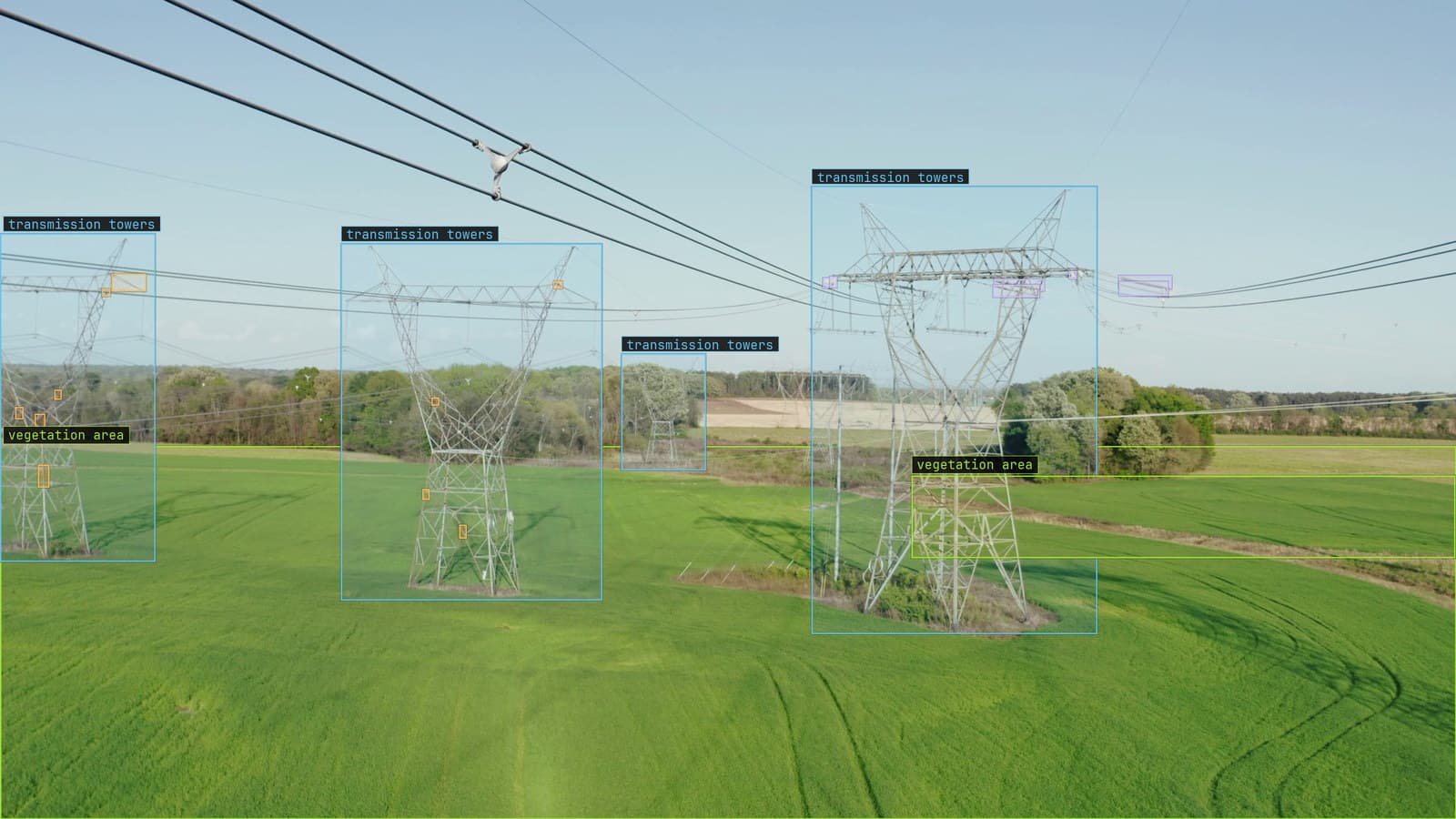
Transmission line over farmland with towers, insulators, defects and vegetation boxed, from a customer aerial survey
The inspection team has three years of labeled drone frames of the same transmission corridor. The first year was labeled in one tool and exported as a folder of XML files, one per image. The second and third were labeled somewhere else and came out as one large JSON file. A contractor added a set last spring as a folder of text files with one line per box. All of it describes the same insulators, the same crossarms, the same vegetation creeping toward the same conductors, and none of it can be trained on together until it is in one format.
The conversion looks like an afternoon of scripting. The part that takes a week is finding out which boxes moved.
A box that moves in conversion is still a box. The file parses, the count is right, the training run starts, and the model learns that an insulator sits a few pixels left of where it is. Nothing reports it, because every check that runs on the file passes. The checks that catch it run on the frame.
Every bounding box is four numbers and the formats disagree on all four
The COCO layout stores a box as the top-left corner, then a width and a height, all in pixels. The YOLO layout stores the centre, then a width and a height, all as fractions of the image size between zero and one. The CVAT XML export stores two corners, top-left and bottom-right, in pixels. Three files can describe the same insulator and share no number in common.
The mistakes follow from that. Read a COCO box as if it were corners and every box comes out too large by exactly its own width. Read a YOLO centre as a corner and every box slides right and down by half its size. Forget to multiply the fractions back by the image width on one axis and every box on a wide frame is squashed toward the left edge. Each of these produces a file that parses cleanly.
The one that took the inspection team the longest was the image size. YOLO fractions need the width and height of the image they were drawn on, and the contractor's frames had been downscaled after labeling. The fractions were right for the original and wrong for the file on disk. On the dashboard the insulator boxes sat on the sky.
Per-image files and one big file both lose something in the join
The XML folder has a file per image, so an image with no labels has an empty file and an image that was never labeled has no file at all. The single JSON file lists every image once and every box against an image number. Converting from the folder to the file, the empty frames and the unlabeled frames both become images with no boxes, and the difference between "an inspector looked and found nothing" and "nobody looked" is gone.
That difference matters for training. A frame with no insulator defects is a negative example, and the model learns from it. A frame nobody labeled is a frame where every real defect will be trained as background. The inspection team kept a list of the truly unlabeled frames from the first year and dropped them from the set rather than let them in as clean.
Polygons have a version of the same problem. The corridor's vegetation was labeled as outlines, and an outline stored as a flat list of numbers in one format and a list of pairs in another survives the join only if the vertex order does. Reverse it and the polygon is still closed, still the right area, and inside out for any tool that cares about winding.
Class numbers mean nothing without the list they index
YOLO labels carry a class as a number and the list of names in a separate file. The contractor's list had insulator as class zero and vegetation as class one. The second tool's export had them the other way round. Merged by number, a third of the dataset had every insulator labeled as a tree.
Merge by name and check the names. The first year used "insulator", the third used "insulator string", and the contractor used "Insulator" with a capital. Three classes in the merged file where the corridor has one. The labeling with Lexi guide makes the point for a live project, that renaming or splitting classes mid-way fragments the dataset, and a merge across tools is the same fragmentation arriving all at once from the past.
The vocabulary the team settles on for the merge is the vocabulary the alerts will use later. Pick the words the line crew would use.
Draw the converted boxes on ten frames before training on any
My own view is that no statistical check on a converted file is worth as much as ten frames with the boxes drawn on them. Count the boxes per class before and after and the counts will match, because a shifted box is still counted. Check that every coordinate is inside the image and the squashed boxes pass, because they are inside the image. Draw ten frames from each source at random, from the January and December runs of each year, and look at whether the box sits on the insulator.
The frames to draw are the edge cases. The widest frame in the set, the one with a box touching the right edge, the one with the most boxes, the one with a polygon. A conversion that survives those survives the rest.
A round trip is the second check: convert to the target format and back to the source, and compare the numbers. A box that returns to within a pixel of where it started was converted correctly in both directions. One that returns a few pixels off has a rounding step somewhere, usually the fraction to pixel conversion, and a box that returns to the wrong place entirely has the corner and centre confusion above.
Somebody on the team kept the frame with the insulator boxes on the sky pinned above their desk. It is a better reminder than any test.
The platform reads all three and re-encodes none
Once the set is clean it can arrive in any of the three. The platform imports COCO JSON, YOLO TXT and CVAT XML, from an upload, from S3 or from Google Drive, and the footage is not re-encoded on the way in, so the frame on disk is the frame the box was drawn on. The quickstart covers the upload, and the export on the other side is COCO, which for the inspection team is the format the third year was already in.
LexData then takes the corridor model through its whole life. You type what to look for, Lexi puts a box on every frame, and a person checks each label before anything trains on it. The model then watches the footage from the cameras and drones you already have, in the cloud, on your servers, or on a runner beside the recorder. Frames it is unsure of come back to a person, the corrections retrain it, and the new version replaces the old one with no downtime. Three years of labels that were once in three formats are one dataset, and every box in it sits where the inspector put it.
See it on your own footage.
Start with your footageMore in Labeling
Labeling · 7 min read
AI data labeling workflows, three ways to label footage and when each one pays
A pipeline right-of-way survey labeled three ways: every box by hand, Lexi proposing and a person checking, and synthetic frames for the leak nobody has filmed.
Rajiya Sultana · Oct 2, 2026
Labeling · 6 min read
Annotation analytics, the numbers a labeling queue produces besides labels
Three labelers on a month of warehouse footage produce boxes, and also a throughput, an acceptance rate and a map of where the rejections cluster.
Rajiya Sultana · Oct 2, 2026
Labeling · 6 min read
Blur augmentation in computer vision, training for the blur the camera will produce
A camera on a vibrating gantry, an autofocus that hunts, fog on the housing. Train on the blur the line makes, never on the class it would erase.
Rob Hickey · Oct 2, 2026