

Labeling · 7 min read
Brightness and contrast adjustment for annotation, labeling the defect the camera barely shows
A faintly hot bushing on a night thermal frame is there and the labeler cannot see it. Turn the display up, draw the box, and leave the training pixels alone.
Summary
This post follows a labeler through a night frame from a substation yard and a thermal frame with a bushing running slightly warm, using display brightness and contrast to see what the raw frame hides. It concludes that the adjustment belongs to the display and never to the pixels that train, and that a QA pass on every label is what catches a box drawn on a display artefact. It is for teams labeling low-light and thermal footage from fixed cameras.
Stephen Biswas · Engineer · Oct 3, 2026
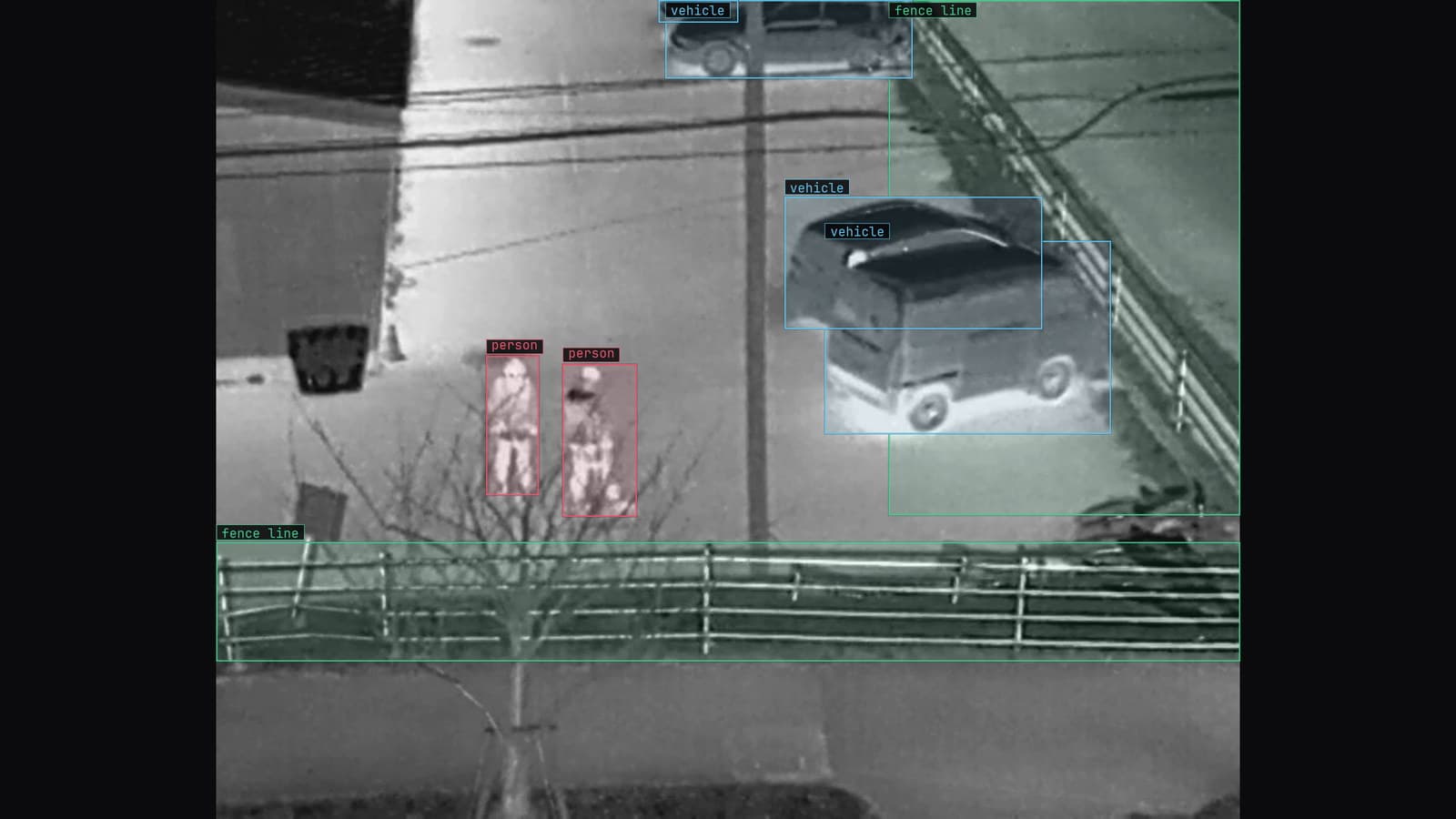
Thermal camera on a substation fence line at night, people at the fence, vehicles and the fence line boxed, from a customer site camera
The yard camera on the substation switches to night mode at dusk, and by 11 pm the frame is mostly black with a grey smear where the transformer is. Somewhere in that smear is a bushing. The labeler's job is to box it, and on the raw frame at the default display, there is nothing to box. The pixels hold the bushing; the screen does not show it.
Next to that frame in the queue is one from the thermal camera on the same yard, where one bushing on the transformer is running a few degrees warmer than its neighbours. On the default palette it is a slightly lighter grey among greys. The labeler is meant to draw a box on the warm one.
Both frames are labeled the same way: by adjusting what the screen shows until the thing is visible, drawing the box, and leaving the frame itself exactly as the camera wrote it.
The hot bushing is in the frame and the labeler cannot see it
A camera records a wider range of values than a monitor displays comfortably, and a night frame packs most of its information into the darkest part of that range. A thermal frame does the same in a different way: the whole scene sits within a narrow band of temperatures, and the difference that matters, a bushing a few degrees warmer at 11 pm, is a few steps of grey out of hundreds.
To the model, those steps are as real as any other. To the labeler at a screen in a lit room, they are invisible, and a box drawn on what the labeler cannot see is a guess. The substation and equipment monitoring use case is a position question, where the hot signature sits relative to the equipment, and a guessed position teaches the model a wrong one.
Display adjustment changes what the labeler sees and nothing else
The labeling tool has a brightness and a contrast control for the display, and the important word is display. Sliding brightness up lifts the whole frame on screen so the outline of the transformer in bay 2 comes out of the black. Sliding contrast up stretches the narrow band of greys on the thermal frame so the warm bushing turns from a slightly lighter grey into an obvious one. The box is drawn on what is now visible.
Underneath, the frame is unchanged. The file the model will train on has the same values it had when the camera wrote them, and the box coordinates are in the same frame either way. The adjustment lives in the tool, for the person, for the time it takes to draw the box.
The thermal camera's palette was set to a rainbow scheme by the installer three winters ago, and nobody has changed it, which is why the labelers prefer to switch the display to plain grey before they adjust anything.
Brightness lifts the night yard and contrast separates the bushing
The two controls do different jobs, and on the two frames from the Tuesday night they are used in different proportions. The night frame needs brightness first, because the problem is that everything is dark; once the transformer is visible, a little contrast separates the bushing from the tank behind it. The thermal frame needs almost no brightness and a lot of contrast, because the problem is that everything is the same middling grey and the warm bushing has to be pulled away from the rest.
Both frames are easier at an extreme than most labelers expect. Pushing the thermal contrast until the frame is nearly black and white makes the warm bushing a white patch on a dark transformer, and the box goes on in a second. The frame looks ugly at that setting and it does not matter, because nobody is training on the display.
My own view is that the adjustment should reset for every frame rather than carry over. A contrast setting that made one thermal frame perfect will make the next one, taken at a different ambient temperature, into a wall of white, and a labeler who has stopped resetting draws boxes on whatever the sticky setting happens to show.
The pixels that train stay exactly as the camera wrote them
There is a temptation, once the adjusted frame looks so much better, to save it that way and train on the improved version. That replaces a labeling aid with a preprocessing decision, and the two should never be confused. The live camera on the yard will keep sending dark night frames and flat thermal frames. A model trained on brightened frames will be asked about dark ones, and the gap between what it learned and what it sees is a gap the team introduced by hand.
If the frames should be adjusted before training, that is a decision about the pipeline: applied to every frame, at training and on the live camera alike, written down as a step. The labeling with Lexi doc keeps the two apart for this reason. Display adjustment is for the person drawing the box. Preprocessing is for the model, and it is applied on both sides of the camera or on neither.
A QA pass on every label checks the box against the raw frame
An adjusted display creates a failure of its own. Push contrast far enough and noise in a dark frame becomes texture, and a labeler who has been staring at the yard for an hour boxes a patch of amplified noise as a bushing. The box looks fine on the adjusted display. On the raw frame it sits on nothing.
That is what the QA pass is for. The second person looks at each label with the frame at its default display and at an adjusted one, and asks whether the thing in the box is there in the pixels or only in the stretched display. A box that exists only at high contrast is rejected. On the energy sites we run, labels come back at up to 99.9% accuracy because that second look happens on every frame, and on thermal footage the second look is where most of the rejections come from.
The same pass catches the opposite failure: the bushing that was warm, visible at high contrast, and boxed on none of the frames from the Tuesday night because that labeler never adjusted the display. Both are the same mistake, a label drawn on the screen rather than on the frame.
The model learns the dark frame the person could not read
LexData takes the yard model through its whole life. You type what to look for, Lexi puts a box on every frame, and a person checks each label before anything trains on it, with the display turned up as far as it needs to go. The model then watches the yard camera and the thermal camera the substation already has, in the cloud, on your servers, or on a runner beside the recorder. Frames it is unsure of come back to a person, the corrections retrain it, and the new version replaces the old one with no downtime.
The frames it doubts are, in the first winter, mostly the dark ones. A bushing at 2 am in fog, a thermal frame on the coldest night of the year when the whole transformer reads flat. Those come back to the labeler, who turns the display up, finds the bushing, and draws the box. The review queue is the same job as the first batch, done on the frames the yard chose rather than the ones the team did.
A thermal camera swapped for a newer model, with a different range and a different noise floor, is a change the labeler's contrast slider will hide and the model will feel at once. The drift catalog covers it as a sensor was replaced, and the labeler who notices the slider needing a different setting from the previous week is often the first to know.
See it on your own footage.
Start with your footageMore in Labeling
Labeling · 7 min read
Aerial dataset augmentation for drone frames where there is no up
A tower seen straight down has no top or bottom, so rotations and both flips are safe. Scale for altitude, brightness for sun, move every box with its pixels.
Esdras Ntuyenabo · Oct 3, 2026
Labeling · 6 min read
A collaborative data annotation workflow run as a pipeline
Batch the bottling line's frames by camera and shift, assign so nothing is boxed twice, attach the guideline, review every label, train on the approved set.
Rajiya Sultana · Oct 3, 2026
Labeling · 7 min read
Dataset health check for computer vision, what to look at before anything trains
A scratch dataset where every scratch sits in the centre of the frame will train a model that looks in the centre. Five counts to read before the first epoch.
Rajiya Sultana · Oct 3, 2026