

Edge · 6 min read
What computer vision model deployment means after the first week
Deploying a vision model is a decision about where it runs, how a new version replaces the old, and what tells you it has started to be wrong.
Summary
This post describes what deploying a vision model involves once the pilot ends, from validating on frames from the real cameras to choosing between the cloud, your own servers and a runner beside the recorder. It concludes that the rollout and rollback path matters more than the serving stack, and that the operator correction rate is the signal to watch after launch. It is for engineering and operations teams taking a model from a notebook to a plant.
Andreas Ohrvall · CTO · Sep 30, 2026
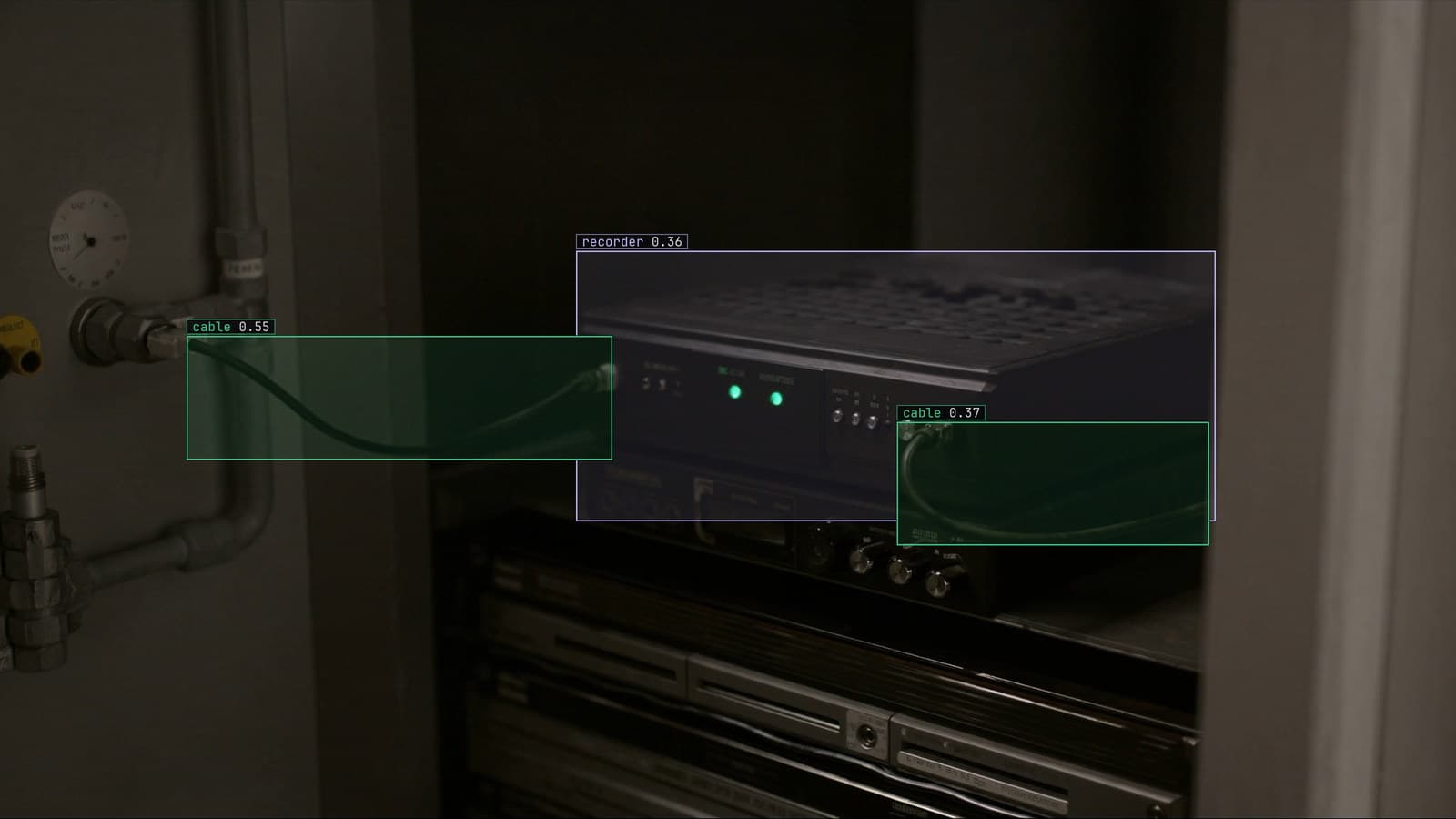
A compute box beside a video recorder in a plant cabinet, generated scene with detections from our model
The pilot ran on a laptop in the quality office for six weeks. The frames came from a phone held up to the glass of the inspection booth on line 2, the model found the defect on most of them, and the slide with the result was shown to the plant manager on a Thursday. The word "deploy" was used in the meeting as if it were the last step.
It is the first step of a different project. The model has to run on frames from the booth camera rather than the phone, somewhere on or near the plant network, for every shift, and it has to be replaced without stopping the line when it is wrong. None of that was in the notebook.
Validation has to run on frames from the real cameras
The phone frames and the booth camera frames are different pictures of the same part. The phone had autofocus and a person aiming it; the booth camera is fixed, slightly above the part, behind glass that gets a film of coolant mist by the end of a shift. A model that scored well on the first set has not been tested on the second.
So the first job before anything runs live is a held-out set from the booth camera itself, across shifts. Day shift under the roof lights, night shift with the lights dimmed in the aisle, the Friday afternoon when the glass has not been wiped. The frames are labeled the same way as the training set, with a person checking each box before it counts, and the model's score on that set is the number that goes on the slide. If it is lower than the notebook number, that is the honest number, and the gap between the two is the size of the problem the pilot hid.
The deployment doc makes the same point from the hardware side: a swapped camera changes the image in ways the model notices before anyone else does, so the frames the model is judged on have to come from the camera it will watch.
Where the model runs is a decision about the footage
There are three places to put it, and the choice is mostly about where the frames may go.
In the LexData cloud, the recorder's stream is sent up and the model watches it there. Simplest to start, and right for a site whose footage may leave the building. On your own servers, managed by us or run by you, the model sits inside your network boundary and the stream never crosses it. On a runner beside the recorder, a small box in the same cabinet, the model watches the stream locally, the footage stays on site, and only the frames it doubts leave, to be reviewed.
The plant on line 2 has a network that was built for PLCs and a badge reader, and the recorder sits in a locked cabinet whose key lives with the maintenance lead. A runner in that cabinet is the answer that needs no conversation with the IT department about video crossing the firewall, and it means an alert fires locally first, before anything has left the site.
The new version replaces the old one while the line runs
Every model is wrong about something on the day it launches, and the second version is the one that matters. How it gets to the booth is the part of deployment that decides whether there is a second version at all.
If replacing the model means stopping the consumer, copying weights, restarting and hoping, then it happens once a quarter, on a planned outage, and the corrections pile up in between. If the new version is loaded beside the old one, takes the next frame, and the old one is retired once the new one is serving, then it happens whenever the retrain finishes, and nobody on line 2 notices.
LexData takes the model through its whole life. You type what to look for, Lexi puts a box on every frame, and a person checks each label before anything trains on it. The model then watches the booth camera, in the cloud, on your servers, or on a runner beside the recorder. Frames it is unsure of come back to a person, the corrections retrain it, and the new version replaces the old one with no downtime. Versions keep what they were trained on, so the model watching the line on a given Tuesday can be traced back to the frames it learned from.
The previous version stays where it can be rolled back to
A new version can be worse. It learned from a month of corrections that were mostly night-shift frames, and now it over-reads on the day shift. The frames that show this arrive in the first hour, and the right response is to put the previous version back, in the same way the new one arrived, and look at the corrections before trying again.
My own view, and I hold it firmly, is that the rollback path should be exercised on the day of the first rollout, before anything has gone wrong. Roll version 2 out, roll back to version 1, roll version 2 out again. If any of those three steps needs a person in the cabinet with a keyboard, the deployment is not finished.
A version that was rolled back is not deleted. It is the record of what the model was doing when the corrections that produced version 3 were made.
The correction rate is the signal after launch
The number that was on the slide is not a number anyone can see once the model is live, because nobody is labeling every frame from line 2 to compute it. What can be seen is the review queue.
The model sends the frames it is unsure of. A person on the quality team looks at each one, agrees or corrects. In week 1 the corrections are the model learning the booth. In week 6 they should be rare. A rise in the rate on one camera from one date is the first sign that something changed. The glass was replaced, or the aisle lights were moved, or a new part variant started on the line without anyone telling the model. The platform shows that rate per camera because the frames coming back, and the corrections landing on them, are what the loop is built on.
The plant manager's slide gets a second version too. It no longer says what the model scored in the quality office. It says how many frames came back this week from the booth on line 2, how many a person had to correct, and which version is watching the line tonight.
See it on your own footage.
Start with your footageMore in Edge
Edge · 6 min read
Edge AI fleet management for fifty runners across five plants
Fifty small boxes beside fifty recorders, one model version, and the IT patch that changes what every camera sends. What a fleet needs before the second plant.
Andreas Ohrvall · Sep 30, 2026
Edge · 6 min read
Reducing computer vision inference costs when a store watches every aisle all day
The bill for watching a camera is set by how often you look, what you decode, and where the model runs. Most of a store's frames need no model at all.
Rajiya Sultana · Sep 30, 2026
Edge · 8 min read
AI cameras vs IP cameras, and what changes when the model moves to the edge
The dock camera has streamed to a recorder for six years. A model can watch that stream in the cloud, on your servers or beside the recorder. No new camera.
Andreas Ohrvall · Sep 27, 2026