

Industries · 6 min read
On-shelf availability monitoring with the aisle camera a store already has
Empty facings boxed on the bread bay, glare and black packaging as the false alarms, a cooldown rule to the restocker, alert volume watched against itself.
Summary
This post builds on-shelf availability monitoring from a fixed aisle camera, with the empty facing as the class, glare and dark packaging as the false positives to label out, and a rule with a cooldown that sends the restocker the frame with the bay named. It concludes that alert volume against its own history is how you tell a model problem from a store problem. It is for store operations and retail technology teams.
Rob Hickey · Chief AI Officer · Sep 24, 2026
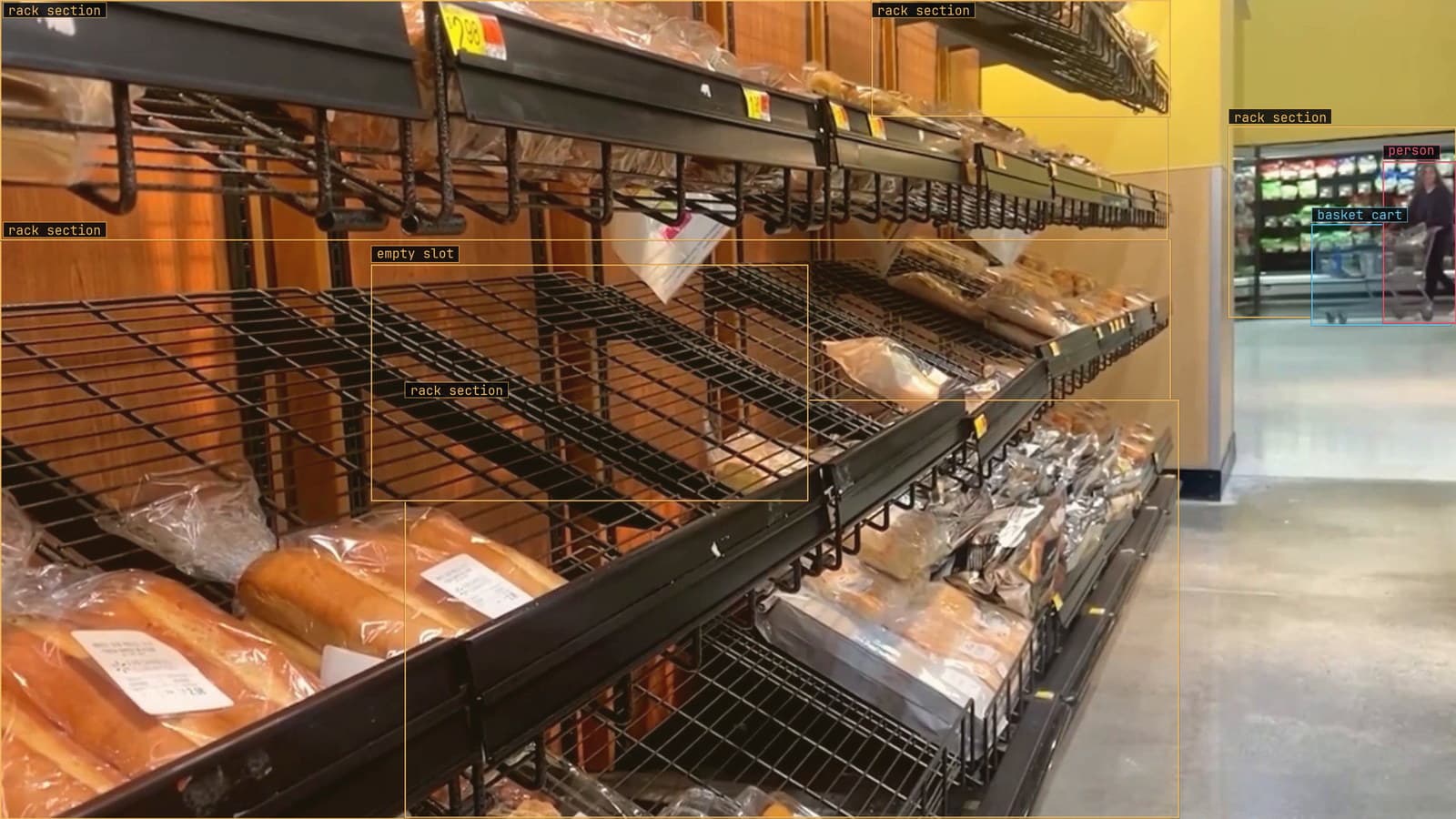
Bread shelf with an empty slot flagged and the rack sections boxed, from a customer store camera
The bread delivery came in at 6 am and by 7:30 am the slot at the end of the bay where the sliced white goes is empty, because that is the end nearest the door and it always empties first. The restocker is in the back with the milk. A customer reaches for the white, finds the gap, takes nothing, and the store has lost a sale it will never see in any report, because a sale that did not happen leaves no record.
The camera over the aisle saw the gap at 7:30 am. What it should do is tell the restocker, once, with a picture, and then keep quiet until the gap is filled.
The empty facing is the class, and object detection learns the shelf
Full planogram compliance asks which product is in which facing, and that means hundreds of classes, many near-identical at shelf angle, changing every time a pack is refreshed. The shelf and planogram compliance use case is that problem, and it is a harder one. On-shelf availability asks a smaller question: is there a gap where there should be product.
So the classes are the empty slot and the rack section, and object detection puts a box on each. The rack sections give the empty slot an address, bay and shelf, without the model needing to know what the missing product was. The model learns what an empty facing looks like on this shelf, at this camera's angle, under this light: the back panel, the pusher pushed forward, the shelf edge with nothing above it.
You type the two classes once, Lexi proposes the boxes on frames from the aisle camera, and a person from the store checks them. The person's job is the half-empty facing, where the last two loaves have slid to the back and the front of the slot is bare, because whether that counts as a gap is a store decision and the label has to carry it.
Glare and black packaging are the false positives to label out
The first version alarms on two things that are not gaps. Glare off the chiller doors at the end of the bay, when the low sun comes through the front windows at about 8 am, throws a white patch across the shelf that reads as a bare back panel. And a facing of black-packaged product, the premium seeded loaf in its dark sleeve, reads as a hole under the aisle lights, because the model learned that dark and flat means empty.
Both are fixed the same way: frames from that camera at that hour, with the glare and the black packs labeled as full facings, checked by a person, and folded into the next version. Neither is fixed by a general model, because the glare is this store's window and the black sleeve is this store's range.
The bread bay empties from the door end first, which the restocker has known for years and the planogram does not.
The rule has a cooldown and sends the restocker the frame
The alert is a rule written as a sentence, with a severity and a cooldown, approved before it goes live: an empty facing on the bread bay, routine, to the restocker's handset, and to the manager's Slack on the 7:30 am gap. What arrives is the frame with the gap boxed and the bay and shelf named, so the restocker walks to the right place with the right product rather than to a list of codes.
Two settings do most of the work. The rule fires on the change, when a facing goes from full to empty, rather than on every frame the gap is visible, so one gap produces one message. And the cooldown is longer than a restock takes, so the restocker who is on the way is not paged again halfway down the aisle. On the stores we run this is the difference between a handset the staff keep on and one they leave in the drawer.
My view is that the first week should send nothing to the restocker at all. It should go to the store manager's screen, so the manager sees what the model calls a gap before the staff do, and the handset gets the rule only after the manager has stopped disagreeing with it.
Alert volume against its own history tells a model problem from a store problem
The number worth watching after launch is how many alerts the bay produces per day, against how many it produced last week. Two things move it, and they need different responses.
A promotion on the seeded loaf empties the facing by 10 am every day for a fortnight, and the alert count doubles. The model is right on every frame. The base rate moved, and the drift catalog files this under the defect rate changed: per-detection accuracy holds while the downstream count swings, and the fix is to retune the cooldown or the rule against the new rate rather than touch the model. If the rate moved because the store moved, because of a promotion or a delivery change or a new range, that is an operations finding worth surfacing on its own.
The other case is the alerts the restocker dismisses. A gap flagged where the shelf was full, again and again, from one camera, is the correction rate rising, and that is the signal the model needs frames from that camera. Corrections at review retrain it. Asking a question about the footage does not.
LexData takes the shelf model through its whole life. You type what to look for, Lexi puts a box on every frame, and a person checks each label before anything trains on it. The model then watches the aisle cameras the store already has, in the cloud, on your servers, or on a runner beside the recorder. Frames it is unsure of come back to a person, the corrections retrain it, and the new version replaces the old one with no downtime. The 8 am glare frames from the first week are what the second version learned from.
The retail work behind our numbers, 4M+ annotations and validations, comes from stores where the cameras were already on the ceiling and the question was what to do with the frames.
The second store gets its own frames before it goes live
The bay in the next store along, the one that opens at 7 am, has different shelving, a different pusher, a window on the other side and a bread range with a different dark sleeve. The model that is right on the first store is a starting point on the second and no more. A window of frames from the new store's camera, labeled and checked before the store goes live, is the cost of adding a store, and it is paid once. Compare each store's alert volume against its own history rather than a fleet average, because the good stores carry the bad one and the average hides it.
See it on your own footage.
Start with your footageMore in Industries
Industries · 6 min read
AI visual inspection as the nondestructive testing step a camera can take over
Visual testing is the first NDT gate, its acceptance criteria are already written, and a camera can apply them to every weld instead of one in twenty.
Rob Hickey · Sep 24, 2026
Industries · 6 min read
Appearance inspection systems that judge scratches, chips and burrs the same way on every shift
The station, the light and the written standard matter more than the model. The outlines carry the limit, and a tightened tolerance makes every label wrong.
Rajiya Sultana · Sep 24, 2026
Industries · 7 min read
Automated pallet accounting from the camera over the staging zone
A polygon on the frame, every pallet tracked so it is counted once, entries and exits as the ledger, and a wash-down that nudges the camera as the failure.
Andreas Ohrvall · Sep 24, 2026