

Industries · 7 min read
Retail planogram compliance checked from one shelf photo on the aisle camera
Right product, right facing, right price, from one frame of the cereal bay. Products and tags boxed, rows parsed, prices read, and a reset is a spec change.
Summary
This post checks a planogram from one frame of an aisle camera, boxing products, price tags and shelf talkers, sorting the boxes into shelf rows, reading the prices, and comparing the result with the planogram the merchandising team published. It concludes that a planogram reset changes the right answer for every bay without changing a pixel, so the comparison has to read the current planogram every morning. It is for store operations and merchandising teams.
Ayman Quadir · Head of Product · Sep 25, 2026
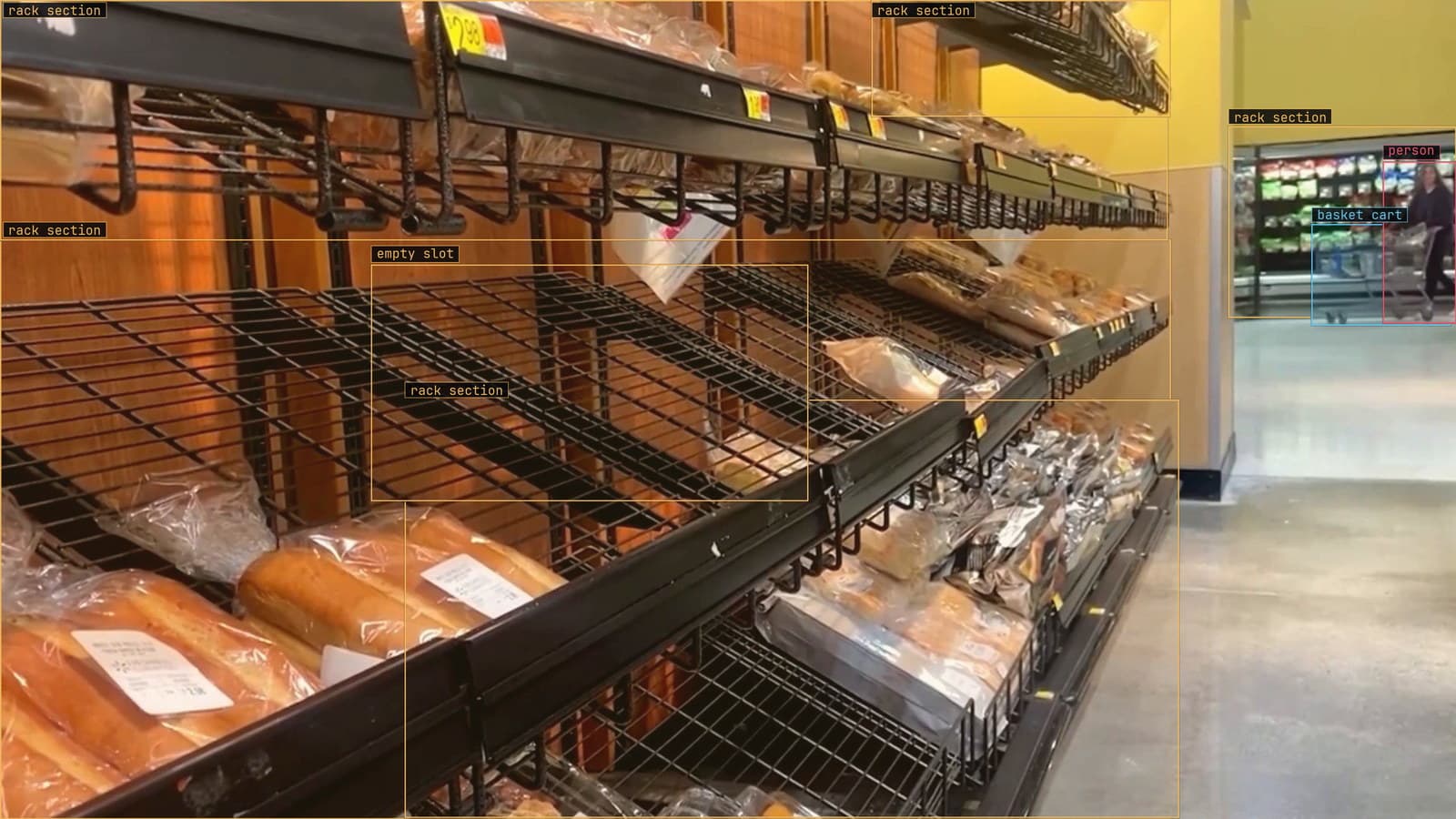
Bread shelf with an empty slot flagged and rack sections boxed, from a customer store camera
The cereal bay in aisle 4 was reset on Sunday night. The planogram says the family-size boxes go on the third shelf, four facings each, with the promotional talker on the second shelf edge and the own-brand at eye level. By Tuesday morning the family-size boxes are on the second shelf because that is where the night crew found room, two facings have been filled from the wrong case, and the talker is on the floor behind the bay. The merchandising team will find out in three weeks when the field auditor walks the store with a tablet.
The aisle camera looked at that bay on Monday at 7 am, before the store opened, and the frame it took has everything the auditor's tablet would have recorded.
Object detection boxes the products, the tags and the talkers
A planogram check needs three kinds of thing from the frame: the products on the shelf, the price tags on the shelf edge, and the promotional talkers hanging in front of it. Each gets its own class and its own box. Products are the hard class for object detection, since a bay of cereal is a wall of small rectangles with similar colours, and the difference between the family size and the regular is a few pixels of height at the distance the camera sits.
The frames come from the aisle camera at its ceiling mount, at the angle it actually has, with the aisle lights on. A product photographed square-on from the catalogue teaches the model about a pack it will never see at that angle. You type the three classes once, Lexi proposes a box on every product, tag and talker in every frame, and a person checks the proposals, with most of their attention on the products at the ends of the bay where the angle is steepest.
The retail work behind our numbers, 4M+ annotations and validations, is largely this: shelf frames from ceiling cameras, boxed pack by pack and checked by a person.
The boxes become rows before they can become a planogram
A planogram is a grid: shelves from the top down, positions from the left. A frame is a set of boxes with pixel coordinates. Turning one into the other is mostly geometry. The bottom edges of the product boxes cluster at the shelf heights, so sorting the boxes by their bottom edge and cutting where the gaps are gives the shelves. Sorting within a shelf by the left edge gives the positions. A price tag belongs to the product directly above it, which is a rule the planogram also uses.
Two things break the geometry. A camera that looks along aisle 4 at an angle gives a shelf that slopes across the frame, and the clustering has to follow the slope rather than the horizontal. And an end cap with a curved front puts products at different distances from the camera, so a facing at the far side is smaller than the same facing near it. Both get handled with a per-bay setup done once, when the camera is mounted, and redone when the camera moves.
The price on the tag gets read and matched to the product above it
The tag under each facing has a price, a product name and a barcode printed small. Reading it from a ceiling camera is at the edge of what the resolution allows, and the read has to become fields the planogram can be compared against: a price as a number and a product name as a key to look up. This is where LexInsight is asked a question of the frame rather than the detector asked for a class. The question "what price is printed on this tag" has an answer with the frame behind it, and the answer goes into the row beside the product the geometry paired it with.
A tag that could not be read, a name that did not match, a price in a format the rules do not cover: none of these is passed as a match. They come back to a person with the frame and the tag boxed, and the person's read is what the record keeps.
The lookup is where the effort goes. The planogram names the product one way, the tag abbreviates it another, and the match has to survive that. Keep the size and the flavour in the key, because the difference between two products on the same shelf is often a single word the tag has shortened.
The comparison is a table with one row per facing
With rows parsed and prices read, the frame is a table: shelf, position, product found, facings counted, price read. The planogram is the same table with the columns the merchandising team meant. Comparing them row by row gives the compliance report: right product in the wrong place, the wrong product in the right place, fewer facings than planned, a price on the tag that disagrees with the planogram, a talker missing.
Each of those is a different job for a different person, which is why the report is sent as rows and frames rather than as a score. The rule is written as a sentence, with a severity and a cooldown, approved before it goes live: any bay in aisle 4 out of planogram on the morning frame, routine, to the store's morning list, with the frame and the row attached. The store manager fixes the family-size boxes before opening. A compliance percentage sent to head office fixes nothing.
I would argue, with anyone in retail who will listen, that a planogram check should never page a person. A bay out of planogram at 7 am is a job for the morning list; a manager woken for cereal is a manager who turns the alerts off within a week.
A planogram reset changes the right answer without changing a pixel
On the Sunday of the next reset the planogram for aisle 4 changes. The family-size boxes move to the second shelf on purpose. The Tuesday frame looks exactly like the one that was flagged last month, and this time it is correct. The drift catalog calls this a spec change: the footage did not move and the right answer for every facing in the bay changed overnight.
The model cannot see it and no monitor of the footage will catch it. What catches it is the comparison reading the current planogram every morning, before it compares. A planogram kept in a spreadsheet on somebody's laptop is a planogram the check cannot read, and the store will be flagged for being right until somebody notices.
The shelf and planogram compliance use case puts the same problem in its own words, and the wider retail picture, from queue length to open doors, is built the same way.
The fiftieth store is a new site with its own frames
LexData takes the shelf model through its whole life. You type what to look for, Lexi puts a box on every product, tag and talker in every frame, and a person checks each label before anything trains on it. The model then watches the aisle cameras a store already has, in the cloud, on your servers, or on a runner beside the recorder. Frames it is unsure of come back to a person, the corrections retrain it, and the new version replaces the old one with no downtime.
Every store has different shelving, different tag holders and different light, and a model that has seen one store does not transfer to the next without a window of that store's own frames, labeled and folded in before the store goes live. The correction rate per store is the thing to watch after that. A store where the staff override the report more each week is a store where a pack refresh has shipped that the model has not seen, and the corrections on those frames are what the next version learns from.
An aside from the aisle: the night crew at one store keeps a printed planogram taped inside the stockroom door, marked up in biro with where the boxes actually went, and it is a better record of the bay than anything the tablet holds.
See it on your own footage.
Start with your footageMore in Industries
Industries · 7 min read
Counting the screws in a kit with object detection over the bench
A camera over the kitting bench counts every screw and bottle one box at a time. Exact for kits, a band for cases, and a half-hidden item is a written rule.
Rajiya Sultana · Sep 25, 2026
Industries · 7 min read
Automated water meter reading with a camera in the vault
Ten digit classes in a fixed row turn a truck roll into a frame. A rolling digit and condensation on the glass are the frames that come back to a person.
Stephen Biswas · Sep 25, 2026
Industries · 7 min read
Body-in-white inspection with a station camera on unpainted steel
Dents on a bare body shell hide in the reflections. Masks give the extent, a second pass decides reportable, and a tightened tolerance is a spec change.
Finn Ellingwood · Sep 25, 2026