

Labeling · 7 min read
SAM assisted segmentation labeling, click the patch and correct the mask
A labeler clicks a corroded patch, a mask appears, and the job becomes correcting an edge instead of tracing one. The person earns it where the proposal fails.
Summary
This post follows a labeler drawing corrosion masks by clicking a patch, correcting the proposed outline and accepting it, then propagating masks along frames of a conveyor. It names the places the proposal fails, thin structures, low contrast and rust that fades into stained steel, and argues that the QA pass on every accepted mask is what makes the method safe. It is for teams moving from traced polygons to click and correct.
Stephen Biswas · Engineer · Oct 2, 2026
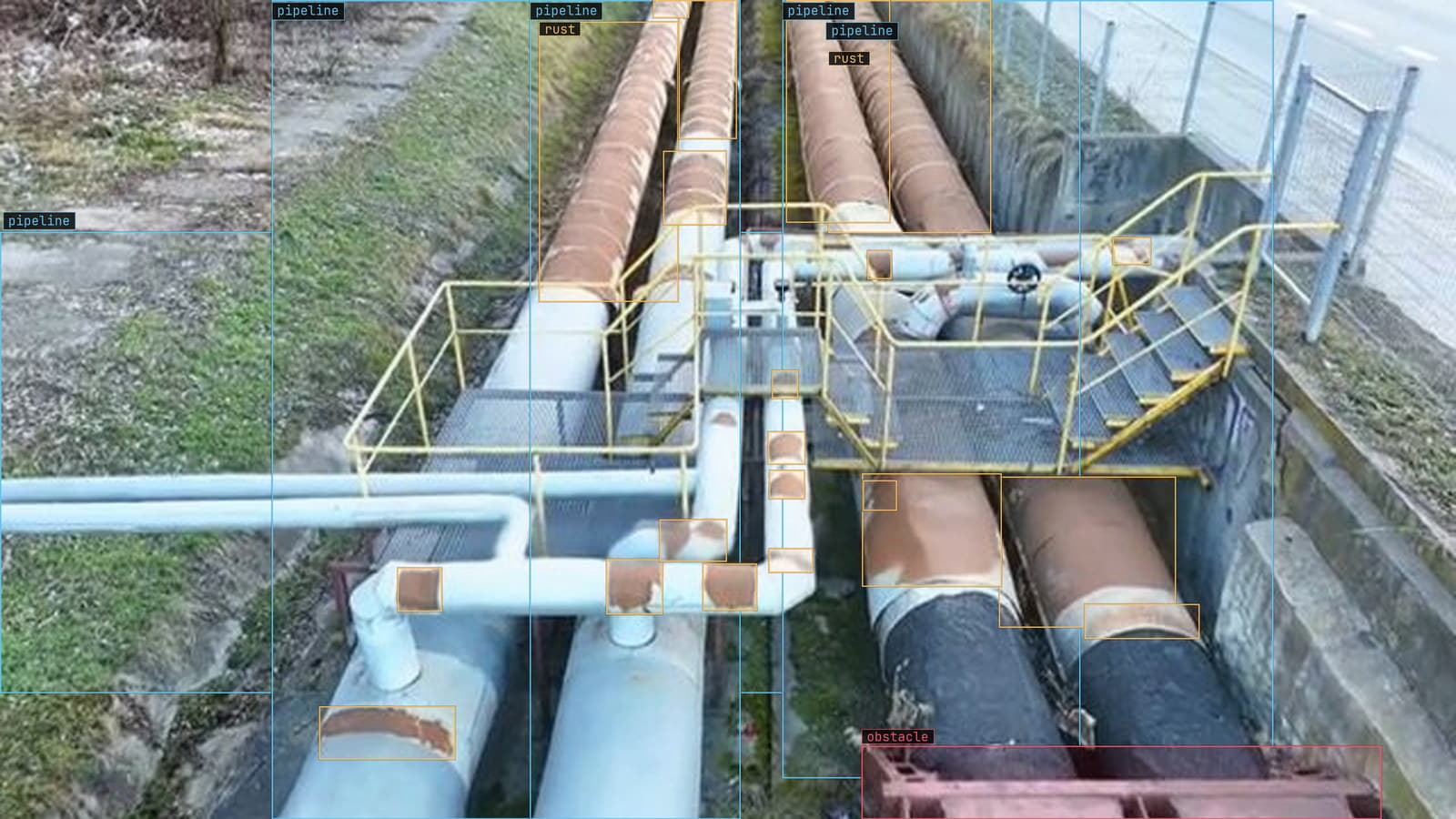
Pipe rack with rust marked along five pipe sections, from a customer inspection run
The frame on the labeler's screen is a pipe rack photographed from a walkway on a Tuesday inspection run, and the job is to outline every patch of rust on it. A year ago that meant tracing each patch by hand, vertex by vertex, at forty clicks a patch on a frame that holds a dozen of them. Today the labeler clicks once in the middle of the largest patch, a mask appears around it, and the next minute goes on checking whether the mask's edge is where the rust ends.
That is the whole change. The labeler's job moved from drawing to judging.
The judging is not a smaller job. A proposed mask is a guess about where a boundary sits, made by a model that has never seen this pipe rack, and the person accepting it is vouching for every pixel of the edge. Where the guess is good the label takes seconds. Where it is bad, and this post spends most of its time on where it is bad, the person has to notice before clicking accept.
A click replaces a traced polygon where a bounding box will not do
The corroded patch on the third pipe from the left has a clear edge: orange rust against grey paint. One click near its centre and the proposal follows the edge almost exactly. A second patch bleeds across a flange and the proposal stops at the flange, so the labeler adds a second click on the far side and the mask joins up. A third patch has a bolt in the middle that the proposal has cut out, and a click on the bolt with the exclusion modifier fills it back in.
Three patches, five clicks, under a minute. The traced polygon that used to represent the same work is still there underneath in the export, since a mask can always be turned into one. Labeling with Lexi starts from the same place: you type the class, the proposal lands on every frame, and a person confirms, fixes or rejects it before anything trains.
A bounding box is still the right label for most questions, because most questions are where and how many. Corrosion is graded on area, and area is what a box discards. The corrosion and structural degradation page says it in one line: the label has to be the measurement, or every downstream number is a proxy for how close the inspector stood.
Masks propagate along a conveyor but the last frame needs a look
On a fixed camera over a conveyor, the same part is in view for a run of frames, and a mask drawn on the first frame can be carried along the track to the rest. The labeler draws one mask on the casting at the entry to the belt, and the proposal follows it across the next forty frames as the part slides under the light, at about 4 frames a second on this line.
Propagation is where the time saving becomes large, and where the failure is quietest. The mask is good on frame one because a person made it good. On frame twenty the part has rotated a little and a shadow now sits along one edge, and the propagated mask has drifted a few pixels off the metal and onto the belt. Nobody clicked on frame twenty, so nobody saw it. The frames at the end of a run are the ones to open, because if the mask still fits there it probably fits in between.
A short run is safer than a long one. Ten frames carried, then a fresh click, then ten more.
The proposal fails on thin structures and low contrast
The failures cluster, which makes them checkable. Wire rope, cable trays, the thin edge of an angle bracket on the Thursday frames: a structure a few pixels wide is where a proposal either misses entirely or balloons into the background behind it. The click lands on the rope and the mask that comes back is the wall.
Low contrast is the second cluster. Rust on a rust-coloured primer, a wet patch on dark steel, corrosion under a coat of dust the same shade as the corrosion. The proposal has no edge to follow, so it invents one, usually a smooth curve where the real boundary is ragged. On a corrosion job this is the expensive miss, since the area under the mask is the number the report carries.
The third is ambiguity the model cannot be blamed for. Two qualified inspectors outline the same patch differently, and a proposal will pick one of their answers at random. The fix belongs in the guideline rather than the tool: write down whether staining counts, whether pitting inside a patch is part of the patch, and where a patch that fades into clean steel is deemed to end. A labeler who has read that ruling corrects the proposal to it. A labeler who has not accepts whichever edge the proposal drew.
Every accepted mask still gets a QA pass
My own view is that click and correct made the QA pass more important, not less. Tracing a polygon by hand is slow enough that the labeler looks at every vertex. Accepting a proposal is fast enough that a plausible wrong mask sails through, and reviewers anchor on drafts: a mask that looks right gets accepted more often than a blank frame gets a missed patch drawn in. The person checking after the labeler is the only step that catches that.
The pass looks at the edge, at the area the mask encloses against a ruler in the frame, and at what the mask missed. A small random sample from each session is redrawn from scratch and compared with what was accepted, and the disagreement rate is the number to watch across weeks. Labels that go through that pass come back at up to 99.9% accuracy, which is the figure the whole method has to hold to be worth the speed.
Somebody on every corrosion job keeps a folder of the frames where the proposal was confidently wrong. It is the best training material for new labelers there is.
The export is COCO and the model only ever sees the corrected mask
Nothing about the proposal reaches the training set. What trains is the mask a person accepted, in COCO JSON, with the polygon that the mask was reduced to and the class the labeler confirmed. The dataset for the pipe rack is a few thousand corrected patches across two seasons of inspection runs, and the model that trains on it has no memory of which ones were traced and which were clicked.
LexData takes that model through its whole life. You type what to look for, Lexi puts a mask on every frame, and a person checks each label before anything trains on it. The model then watches the cameras you already have, in the cloud, on your servers, or on a runner beside the recorder. Frames it is unsure of come back to a person, the corrections retrain it, and the new version replaces the old one with no downtime. The corrections on those doubted frames are drawn the same way, a click and a fix, and they are the labels the next version learns the most from.
See it on your own footage.
Start with your footageMore in Labeling
Labeling · 7 min read
AI data labeling workflows, three ways to label footage and when each one pays
A pipeline right-of-way survey labeled three ways: every box by hand, Lexi proposing and a person checking, and synthetic frames for the leak nobody has filmed.
Rajiya Sultana · Oct 2, 2026
Labeling · 6 min read
Annotation analytics, the numbers a labeling queue produces besides labels
Three labelers on a month of warehouse footage produce boxes, and also a throughput, an acceptance rate and a map of where the rejections cluster.
Rajiya Sultana · Oct 2, 2026
Labeling · 7 min read
Annotation format conversion between COCO, YOLO and CVAT without losing a box
Three years of line inspection labels from two tools arrive in three formats. The boxes that shift are the ones nobody draws on a frame before training.
Esdras Ntuyenabo · Oct 2, 2026