

Operations · 6 min read
Computer vision on the industrial HMI, the camera's verdict on the operator screen without the noise
The verdict as a state, the frame one click away, an alarm the operator acknowledges like any other, and everything else kept off the screen.
Summary
This post is about putting a camera's verdict on the operator screen of a packaging line, in the grammar the HMI already uses: a state rather than a score, the frame one click away, an alarm with a severity and an acknowledgement, and the model's internals kept off the screen. It argues that the HMI should show the operator what to do and nothing the operator cannot act on. It is for controls and automation engineers wiring a vision model into a line.
Andreas Ohrvall · CTO · Sep 28, 2026
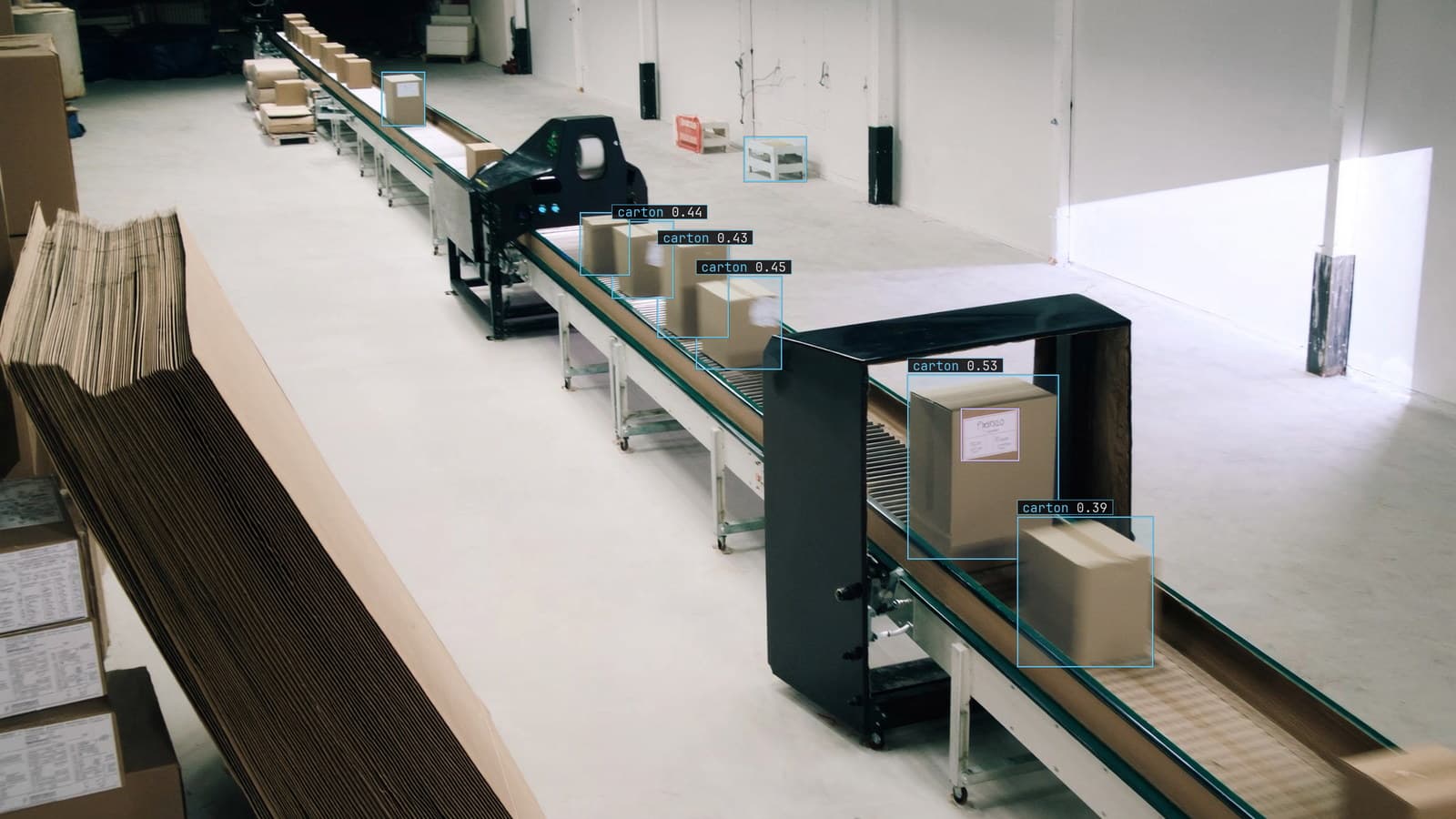
Packaging line, cartons with labels moving past the scanner, generated scene with detections from our model
The operator screen for packaging line 2 is a grey diagram of the line with a few numbers on it: belt speed, carton count, the case sealer's temperature. It was drawn that way on purpose. Nothing on the screen is coloured unless something is wrong, so when a value turns amber the operator's eye goes to it without being told. A camera has just been mounted over the label station, and the model watching it returns a box, a class and a score on every frame, every couple of seconds.
None of that belongs on the screen as it is. The question is what does.
The HMI shows the operator what to do, and SCADA keeps the rest
The two are easy to blur. The SCADA layer collects every value from the line, stores it, trends it, and raises alarms from it. The HMI is the part the operator looks at, and a good one shows a small fraction of what SCADA holds: the state of each unit, the values that are heading somewhere they should not, and the alarms that need a person. The rest is a click away, for the engineer who wants it.
A vision model produces a stream of values that the historian could store in full. The operator needs almost none of them. What the operator at line 2 needs is one thing per station: is the label station in a good state or not, and if not, what to do.
The verdict goes on the screen as a state and never as a score
The model's score is a number that ranks one detection against another, and it means different things on different classes and different days. Put it on the HMI as a number and the operator will watch it move and learn to ignore it, or worse, learn a threshold from it that was never designed. The verdict on the screen is a state: labels correct, or label fault. Two words, one colour when it is the second, grey when it is the first.
The state comes from a rule written as a sentence, and the monitoring and alerts doc describes how that rule is written: what to look for, on which camera, at what severity. The rule for line 2 says a carton passing the scanner with no label, or a label the reader could not match to the work order, is a label fault. The model's frames become that state, and the HMI draws the state the way it draws every other one.
The frame is one click away and not on the overview
An operator who sees "label fault" at the label station wants to know what the camera saw. The frame with the box drawn on it, the carton, the missing label, is the answer, and it belongs one level down: click the station on the overview, and the detail screen shows the last fault frame beside the station's other values. It does not belong on the overview, where a live picture of a conveyor is the most distracting thing that can be added to a grey diagram.
That matches how a well-built HMI is layered: the overview for the whole line, the unit screen for one station, the detail screen for the values behind it, and the diagnostic screen for the engineer. The camera adds a picture to the unit and detail levels and nothing to the overview.
An aside from line 2: the first version of the detail screen showed the live feed with boxes on every carton, and operators kept it open all shift because it was interesting. It came off after a week, replaced by the last fault frame, and the sealer temperature got looked at again.
The alarm is acknowledged like every other alarm on the line
A label fault that needs a person is an alarm, and it should behave like one. It has a severity, set when the rule was written and approved before it went live. It has a cooldown, so a run of faulty cartons produces one alarm rather than forty. It goes into the alarm list with the sealer's high-temperature alarm and the belt's motor fault, and the operator acknowledges it in the same place with the same gesture.
What arrives with it is the frame, because an alarm the operator can act on in a minute is one where the evidence is already on the screen. A label fault alarm with the carton pictured gets a person to the station. A label fault alarm on its own gets a person to the screen to find out what happened, and then to the station.
The alert path is the same one that serves Slack and email. With a runner beside the line's recorder the alert fires locally first, the frames stay on the plant network, and the plant's integration layer takes the alert from a webhook and writes it to the tag the HMI reads. That is a small piece of plumbing for the controls engineer and it is the whole integration.
What stays off the screen
The model version. The score. The boxes on frames that were fine. The number of frames the model was unsure of this shift. All of it is real and some of it matters to someone, and none of it is something the operator at line 2 can act on. It goes to the historian, to the engineer's diagnostic screen, and to the review queue where a person looks at the frames the model doubted.
My own view is that a vision integration should be judged by how little it adds to the operator screen. One state per station, one frame on click, one alarm with evidence. If the screen has more than that from the camera, something on it is there for the vendor rather than the operator.
The operator's overrides are the signal the model has changed
When the operator acknowledges a label fault and marks it as a false alarm, that override is recorded like any other. When the overrides start rising, the camera is seeing something the model was not trained on: a new label stock with a different gloss, a moved camera after the guard was replaced, the afternoon sun through the new roof panel.
Those frames come back to a person in the review queue, the corrections retrain the model, and the new version replaces the old one with no downtime. The HMI does not change. The state at the label station goes back to grey more often, and the alarm list gets shorter, which is the only measure of the model the operator ever sees. The multi-sensor monitoring use case, where a thermal and a visual camera watch the same station, lands on the HMI the same way: one state, from two feeds, with both frames one click down.
See it on your own footage.
Start with your footageMore in Operations
Operations · 7 min read
Build or buy the layer that keeps a vision model accurate
Two engineers and a pilot can build a detector in a month. The review queue, the versioning and the rollout are what they are still building a year on.
Ayman Quadir · Sep 28, 2026
Operations · 7 min read
Benchmark the model on your own cameras before you believe a score
Two candidate models, two published scores, and a packaging line that only cares which one finds the torn label. The held-out week from your cameras decides.
Rob Hickey · Sep 28, 2026
Operations · 7 min read
A model trained on your warehouse beats one trained on the internet
A general detector calls the forklift a truck and the pallet nothing at all. The held-out week from your own cameras is the only score that counts.
Ayman Quadir · Sep 28, 2026