

Operations · 6 min read
How to count objects in a zone, from a checkout queue polygon to a staging bay
Draw the polygon once, keep the right class, test each box's bottom centre, alert on a count held for a window. Then watch the camera; the polygon will not.
Summary
This post is the sequence for counting objects inside a zone on a fixed camera, worked through on a checkout queue polygon and a staging bay in the same store: draw the zone in image coordinates, filter detections by class, test the bottom centre of each box against the polygon, count on every sample and alert on a threshold held for a window. It concludes that a nudged camera is what silently moves the polygon and that the correction rate on that one camera is how the store finds out. It is for the people building rules on store cameras.
Finn Ellingwood · Engineer · Oct 1, 2026
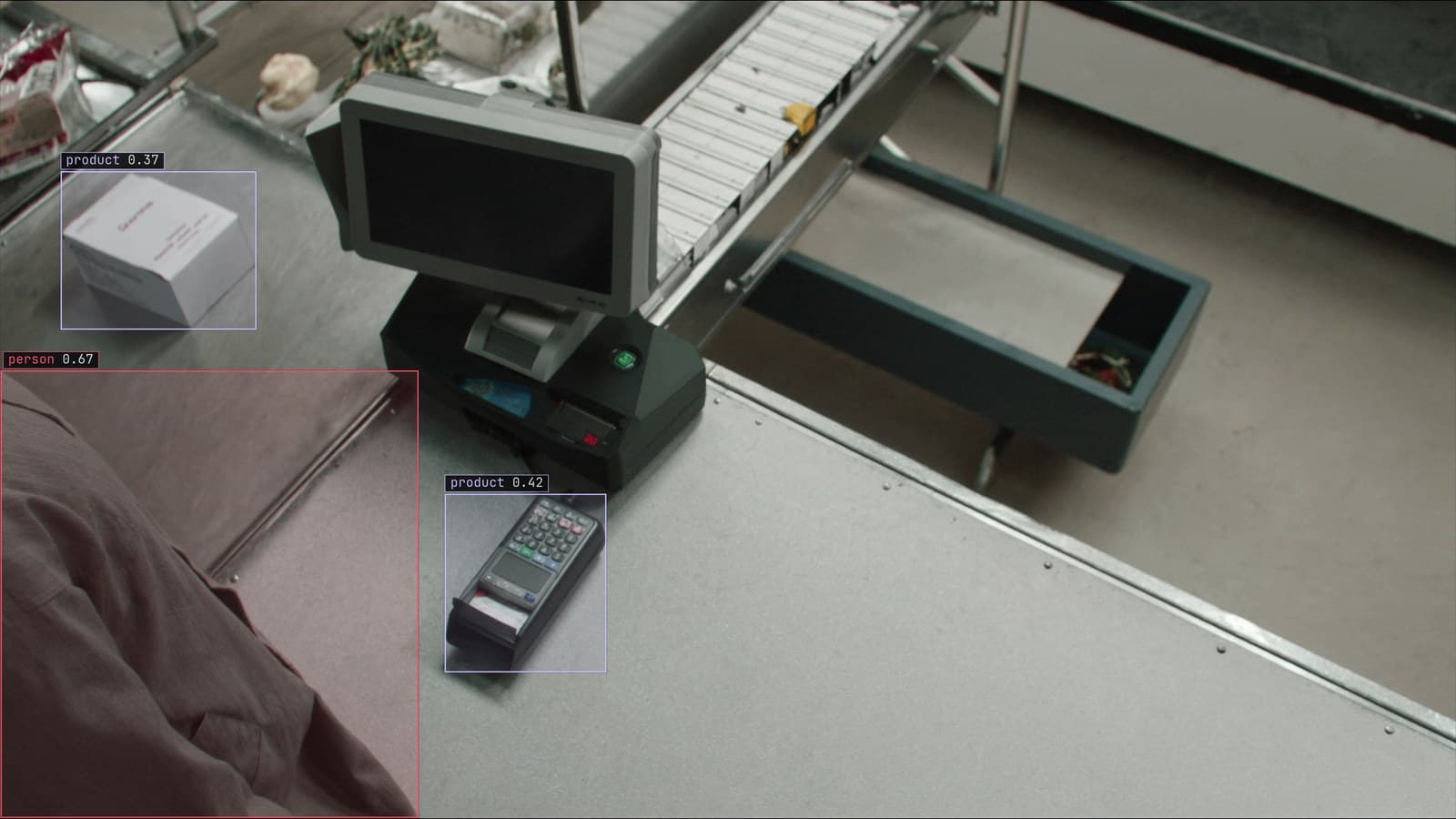
A checkout lane from a ceiling camera, person and products boxed, generated scene with detections from our model
The store has two zones that matter and neither of them is marked on the floor. One is the space in front of checkout 3 where a queue forms when the lunch rush arrives, and the manager wants to know when there are more than a few people in it so a second till can open. The other is the staging bay by the back door, where cages of stock wait to go onto the floor, and the receiving lead wants to know when it is full enough that the next delivery will have nowhere to go.
Both are the same question: how many of a thing are inside a shape right now. The shape is drawn once. The counting happens on every sampled frame.
Draw the zone once, in image coordinates
The zone is a polygon drawn on a frame from the camera, not a rectangle on a floor plan. For checkout 3 it is a shape that follows the lane between the belt and the end of the confectionery display, and it is drawn on a quiet frame, at 9 am, when nobody is standing in it. For the staging bay it is the rectangle of floor between the roller door and the yellow line, seen from the camera in the corner.
The polygon lives in the picture. Its corners are pixel positions on this camera at this framing, and they mean nothing on any other camera or on this one after it has been moved. That fact is the whole of the last step, so it is worth noticing at the first.
Detect, and keep only the class the zone is about
The model runs on each sampled frame, about every two seconds, and returns a box for everything it was trained to find: person, trolley, cage, basket. The queue zone cares about people. The staging bay cares about cages. Everything else in the frame is dropped before any counting, so a trolley parked in the queue lane is not a queue, and a person walking through the staging bay is not stock.
The classes come from the labeling. You type "person" and "cage", Lexi proposes a box on each in every frame, and a person checks the labels before the model trains. The reviewer's attention goes to the cases that will matter in the zone: a child beside an adult, two cages pushed together, a basket held in front of a body.
Test the bottom centre of each box against the polygon
A box is a rectangle and a zone is a shape, and "inside" needs a definition. A box that overlaps the polygon is a poor one, because a tall person standing just outside the checkout 3 lane has a box that reaches into it. The point that works is the bottom centre of the box, roughly where the feet are, or where the cage meets the floor. If that point is inside the polygon, the object is in the zone.
This is the same geometry the checkout queue monitoring use case rests on: a count inside a region, from boxes, with the effort in the region's definition rather than in the detection. The bottom-centre rule is cheap, it is the same on every frame, and the reviewer can see at a glance whether a person was counted for the right reason.
Count on every sample and alert on a count held for a window
The count is the number of kept boxes whose bottom centre is inside the polygon, on this frame. It has no memory, which is right: a queue count at 12:40 is a reading, and 12:42 is another. Two things make it useful.
The first is a threshold. More than a few people in the checkout 3 zone is the number the manager chose. The alert is a rule written as a sentence, with a severity and a cooldown, approved before it goes live: routine, to the floor manager's channel, so a second till opens.
The second is a window. Detection flickers, a person steps out of the lane and back, and a count that crosses the threshold on one sample and falls on the next should not page anyone. The rule holds only when the count has stayed over the line for the window the store set, and the cooldown stops it firing again every two seconds while the queue is being dealt with.
The staging bay rule is the same shape with cages and a higher number, sent to receiving before the lorry is due.
Watch the camera, because the polygon does not move with it
Everything above assumes the camera at checkout 3 is where it was on the morning the polygon was drawn. A cleaner's pole catches the housing in the spring, the camera tips a few degrees, and the polygon that covered the queue lane now covers half the confectionery display. People browsing the sweets become a queue. The second till opens for nobody, three times a day, and after a week the manager mutes the channel.
The drift catalog files this as a camera moved. The model's boxes are as good as ever, the detection rate on that camera diverges from its own history from the date of the knock, and no model metric shows it because the model was never the problem. The signal that reaches a person is the correction rate. Frames from checkout 3 come back for review, the reviewer marks the browsers as not queueing, and the corrections on that one camera climb from one date while the other tills hold.
LexData takes the queue model through its whole life. You type what to look for, Lexi puts a box on every frame, and a person checks each label before anything trains on it. The model then watches the store's cameras, in the cloud, on your servers, or on a runner beside the recorder. Frames it is unsure of come back to a person, the corrections retrain it, and the new version replaces the old one with no downtime. The polygon, though, is redrawn by hand, from the new framing, and that is a five-minute job once someone knows to do it.
Computer vision applications built on a zone share one weakness
The queue lane, the staging bay, a fire exit that must stay clear, a walkway a forklift shares. Computer vision applications built on a zone all rest on the same assumption, that the camera means today what it meant on the day the shape was drawn. The model can be retrained. The shape cannot be retrained, only redrawn.
The store keeps a printout of the 9 am frame with the polygon on it, pinned inside the cabinet by the recorder. When the alerts start making no sense, the first check is whether the camera still sees that frame.
See it on your own footage.
Start with your footageMore in Operations
Operations · 7 min read
AGPL-3.0 licensing risk for computer vision teams serving a model
A camera streaming to a served detector is the network interaction the licence was written for. What a legal review will ask, and why to pick the weights first.
Ayman Quadir · Oct 1, 2026
Operations · 7 min read
Cloud vs owned GPU inference for computer vision, worked out per camera hour
A plant on three shifts and a retailer with cameras spread across stores get different answers from one sum, and footage leaving the building is a cost too.
Ayman Quadir · Oct 1, 2026
Operations · 7 min read
Computer vision heatmaps drawn from the aisle cameras a store already has
Footpoints from every tracked box, aggregated over a day and mapped onto the floor plan, show where footfall goes. A camera nudged in cleaning shifts the map.
Rajiya Sultana · Oct 1, 2026