

Operations · 6 min read
How to increase inference speed for computer vision without a bigger GPU
A defect model that cannot keep pace with the press gets fixed by resolution, sampling and change gating long before the hardware budget is touched.
Summary
This post takes a surface defect model on a stamping line that falls behind the parts passing the camera and works through the fixes in cost order, from matching input resolution to training to sampling frames and running the model only when the part has changed. It concludes that a bigger GPU is the last fix and that a queue growing quietly through a shift is the sign to watch. It is for manufacturing engineers who own a camera on a line.
Andreas Ohrvall · CTO · Oct 1, 2026
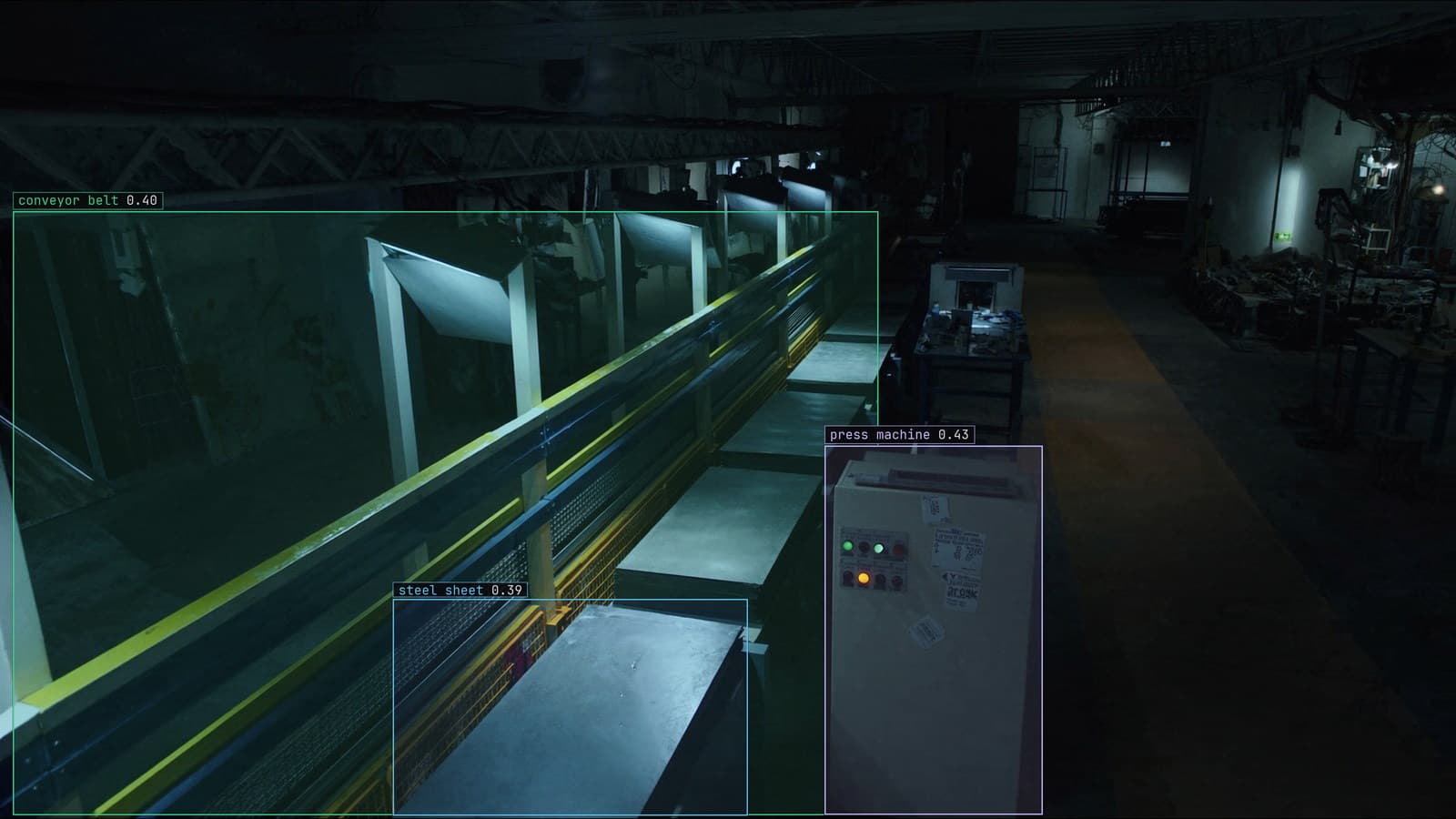
Stamping line with sheets leaving the press, generated scene with detections from our model
The press on line 2 puts a stamped sheet under the camera every couple of seconds. The defect model that was trained over the summer verdicts each one, and for the first hour of the morning shift it keeps up. By 10 am the verdicts are arriving for sheets that left the camera a minute earlier, and by lunch the operator has stopped looking at the screen because the part it describes is already on a pallet.
Nothing failed. No error was logged. The model was simply slower than the press, by a small margin, and a small margin compounds across a shift.
The reflex is to price a bigger GPU. That is the fourth fix on the list, and on most lines the first three make it unnecessary.
The queue grows quietly through a shift
The failure is invisible because each verdict on its own is fine. A sheet takes slightly longer to process than the gap before the next sheet, so one frame waits in the queue, then two, then a hundred. Latency on any one frame looks normal. What has changed is the age of the frame at the front of the queue, and nobody put that on a screen.
On line 2 the first sign was the operator's complaint, which is late. The earlier sign is the gap between when a frame was captured and when its verdict landed, plotted across the shift. Flat means the model keeps up. A rising line means it does not, and the slope says how long until the queue is a shift deep.
That plot belongs beside the model wherever it runs, and the deployment guide covers what the runner exposes about its own health, on a GPU server or on the box beside the recorder.
Match the input resolution to what the model trained on
The camera on line 2 records at its full sensor resolution because that is how it was configured on the day it was fitted. The model was trained on frames resized to a fixed square before they reached the network, and the runtime resizes the full frame to that same square on every sample. The resize is not free, and a frame four times larger than the network's input spends most of its time being shrunk.
Capture at, or near, the resolution the model consumes. If the dent the model looks for is a few dozen pixels across at the training resolution, it is still a few dozen pixels across after the camera is set to match, and the resize disappears from the critical path. When the dent is too small at that size, the answer is a tighter field of view on the sheet, since the press bed around it is not what the model is grading.
This one change, on line 2, took the model from behind the press to ahead of it. The rest of this post was insurance.
Sample the frames rather than run every one
A sheet on line 2 sits under the camera for longer than one frame. The camera produces many frames of the same sheet, and the model was verdicting all of them, which is the same answer computed repeatedly. Sampling every couple of seconds, one frame per sheet, is how the model watches a stream on our platform, and it is the right default for a line where the part is still for a moment.
Where the line never stops, the sample is timed to the press cycle. One frame per stroke, taken as the sheet clears the die, is a complete record of the shift. Frames between strokes show the die closing, and the model has no opinion about the die.
Run the model only when the part has changed
On a line that pauses, a change gate ahead of the model removes the pauses. The gate compares the sampled frame with the previous sample and skips the model when nothing moved. During a die change at 2 pm on line 2 the camera sees the same empty bed for forty minutes, and a gated pipeline runs nothing for forty minutes.
The gate is cheap frame differencing, and it has the weakness that method always has: a shadow from the crane or a change in the hall lighting reads as a change. On a line that is a false positive that costs one model run, which is nothing. It is never a false negative, since a new sheet always changes the frame.
Pose estimation costs more per frame than a box
Some of the load is the task itself. A team on line 2 that asks for the corners of every sheet as keypoints, to check squareness, is running pose estimation on every frame when a bounding box around the sheet and a rule about its aspect ratio would answer the same question. Keypoints are the right tool when the question is really about the geometry. A dent, a scratch, a missing hole and a short-fed blank are all a box and a class.
The same is true of segmentation. An outline of a scratch is more information than the line needs; the line needs to know there is a scratch, and roughly where, so the sheet can be pulled. The surface defect detection use case is boxes for exactly this reason, and boxes are the cheapest thing a detector produces.
My own view is that most vision pipelines that miss their timing are asking a harder question than the line asked. Start from the decision the operator makes and work back to the smallest output that supports it.
Buy the GPU after the three cheaper fixes
Once the resolution matches, the sampling matches the press and the pauses are gated, line 2 has a model with room to spare on the hardware it had. If it still cannot keep up, the GPU is now justified, and the sizing is honest because the load is real work rather than wasted resizing.
LexData takes the defect model through its whole life. You type what to look for, Lexi puts a box on every dent and scratch in every frame, and a person checks each label before anything trains on it. The model then watches the line cameras the plant already has, in the cloud, on your servers, or on a runner beside the recorder. Frames it is unsure of come back to a person, the corrections retrain it, and the new version replaces the old one with no downtime. That is how the manufacturing sites we work with hold 99%+ accuracy in production across a model's life, and why we never promise a frame rate: the right rate is the press's rate.
The operator on line 2 kept a stopwatch in a drawer from the days of timing the press by hand. The gap between capture and verdict, on the screen, is the same measurement with a longer memory. The manufacturing page has the rest of what a plant asks of its cameras.
See it on your own footage.
Start with your footageMore in Operations
Operations · 7 min read
AGPL-3.0 licensing risk for computer vision teams serving a model
A camera streaming to a served detector is the network interaction the licence was written for. What a legal review will ask, and why to pick the weights first.
Ayman Quadir · Oct 1, 2026
Operations · 7 min read
Cloud vs owned GPU inference for computer vision, worked out per camera hour
A plant on three shifts and a retailer with cameras spread across stores get different answers from one sum, and footage leaving the building is a cost too.
Ayman Quadir · Oct 1, 2026
Operations · 7 min read
Computer vision heatmaps drawn from the aisle cameras a store already has
Footpoints from every tracked box, aggregated over a day and mapped onto the floor plan, show where footfall goes. A camera nudged in cleaning shifts the map.
Rajiya Sultana · Oct 1, 2026